
Extended Shipping Rates Pro para Magento® 2.x


Você quer controlar totalmente os custos de envio conforme a região, a data, os feriados, descontos etc.? O módulo "Extended Shipping Rates Pro" para Magento 2 ajuda você nisso.
Nosso módulo não precisa de módulos adicionais para filtrar ou restringir os métodos de envio na página de checkout. Ele cria suas próprias regras para exibir seus métodos de envio.
Nova funcionalidade: alteração de preço com base em regras. Você cria, em um método de envio, regras de preço em quantidade ilimitada. Exemplo: custos de envio 10% mais baratos em feriados e 20% no Ano Novo. Nosso módulo faz isso sem esforço. Você também define restrições de peso, do valor total do carrinho, do preço de qualquer item etc. O número de combinações de regras chega a várias centenas.
Com nosso módulo, você tem realmente um controle ilimitado sobre os métodos de envio e seus custos. Além disso, o módulo é totalmente compatível com todos os nossos módulos para Magento 2.
Demonstração
Você pode testar esta extensão por 30 dias. Solicite a demonstração nesta mesma página com Solicitar demonstração; como funciona está explicado em Teste uma extensão por 30 dias.
| CMS | Magento 2 |
|---|---|
| Compatibilidade | 2.4, 2.3 |
| Recursos |
|
A extensão é instalada com o Composer. Qual repositório você adiciona depende de onde a comprou — a instalação em si é a mesma nos dois casos.
1. Conectar o repositório
Comprada na extmag.com. A página da sua conta mostra o endereço do repositório e suas credenciais pessoais, junto com os dois comandos composer config para colar. Execute-os uma vez por projeto; depois disso, toda extensão que você possui fica disponível no mesmo repositório.
Comprada no Adobe Commerce Marketplace. O pacote é servido de repo.magento.com, que a maioria das lojas já tem configurado. Se não for o caso, adicione as access keys da sua conta Adobe em My Profile -> Access Keys.
2. Instalar a extensão
Execute na raiz do projeto:
composer require extmag/extendedratespro
php bin/magento setup:upgrade
php bin/magento cache:flush
O Composer resolve os pacotes Extmag compartilhados dos quais a extensão depende, então não há mais nada a exigir manualmente.
Saia do admin e entre novamente: a extensão está pronta.
Testar antes de comprar
Você pode pedir uma demonstração de 30 dias desta extensão e instalá-la exatamente como acima: mesmo pacote, mesmo repositório, mesmos comandos. Como funcionam as demonstrações.
Instalar sem o Composer
O arquivo pode ser descompactado em app/code/Extmag/, mas isso deixa a extensão fora do gerenciamento de dependências: os pacotes compartilhados precisam ser instalados à mão e as atualizações nunca chegam até ela. Use o Composer em qualquer loja que você opere, inclusive na demonstração.
Para qualquer dúvida sobre a instalação, fale com nosso suporte técnico.
-
User Guide User Guide.pdf · 795.7 KBDownload
-
Reference Manual Reference Manual.pdf · 433.6 KBDownload
-
Installation Guide Installation Guide.pdf · 270.6 KBDownload
Configuração
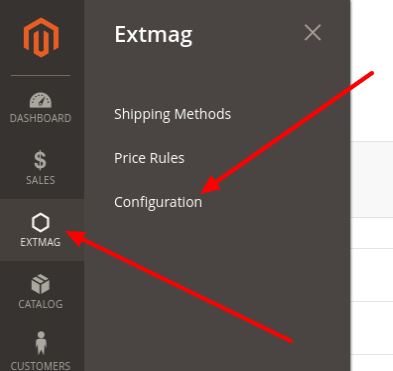
Para configurar a extensão, vá em Extmag -> Extended Shipping Rates -> Configuration.
No grupo Extended Shipping Rates, ative o módulo e preencha o título. O título pode ser alterado em cada método de envio.

Se a sua loja está em modo de desenvolvedor, coloque Debug em Yes.
Os métodos de envio podem ser importados ou exportados quando necessário.
Criar um método de envio
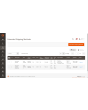
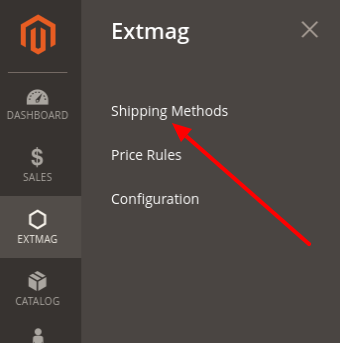
Para criar um método de envio, vá em Extmag -> Extended Shipping Rates -> Shipping Methods.
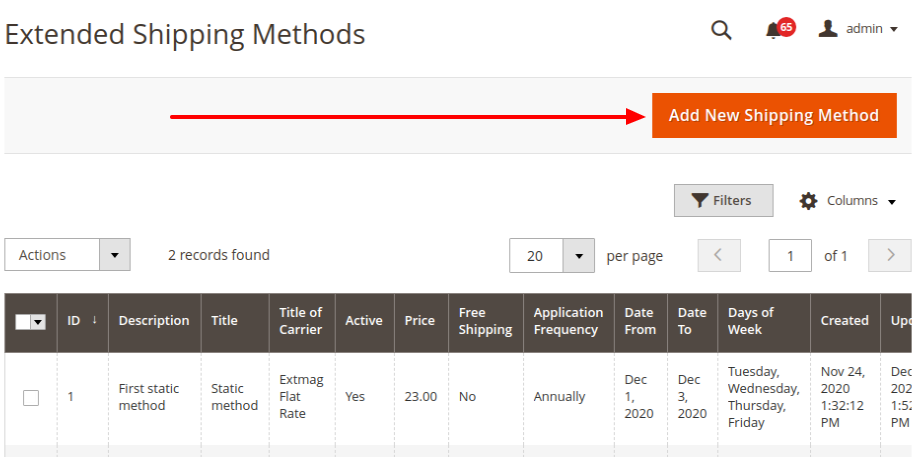
Clique no botão «Add New Shipping Method».
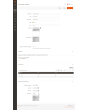
Preencha os campos obrigatórios e salve o método de envio.
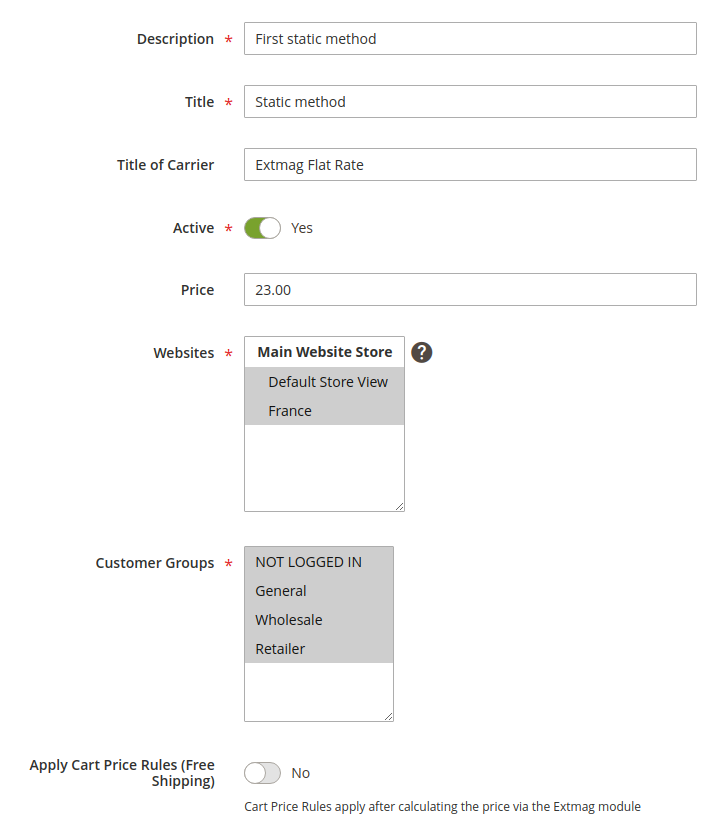
Description — descrição do método para o administrador. Precisa ser única.
Title — o nome do método de envio que o comprador vê na etapa de entrega.
Title of Carrier — o nome da transportadora. O campo sobrescreve a configuração Title do módulo.
Active — ativa ou desativa o método no checkout.
Price — o preço do frete.
Websites — as lojas às quais este método se aplica.
Customer Groups — os grupos de clientes aos quais este método se aplica.
Apply Cart Price Rules (Free Shipping) — se você tem regras de carrinho para frete grátis e quer aplicá-las a este método, ative esta opção.
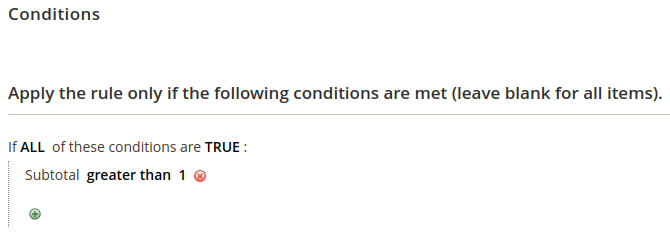
Conditions — regras para exibir o método no checkout, por muitos parâmetros e em qualquer quantidade.
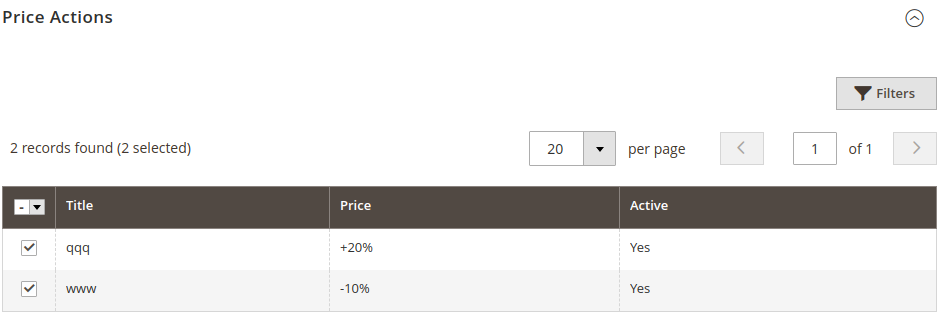
Price Actions — regras de formação do preço final. São independentes entre si e vence o menor preço. A criação de uma Price Action está descrita abaixo.
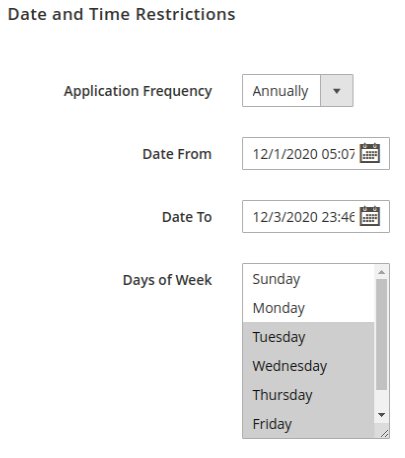
As restrições de data e hora exibem os métodos de envio apenas em datas específicas ou em um período. Eventos cíclicos são suportados.
Application Frequency — a frequência da data em que o método é exibido.
Date From — data e hora de início da exibição do método.
Date To — data e hora de término da exibição do método.
Days of Week — se ao menos um item estiver marcado, o método aparece somente nesses dias da semana.
Criar uma regra de preço
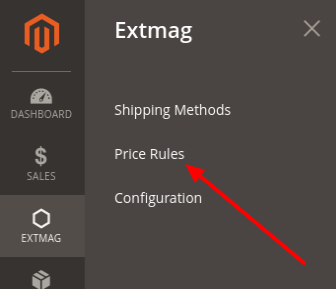
Para criar uma regra de preço, vá em Extmag -> Extended Shipping Rates -> Price Rules.
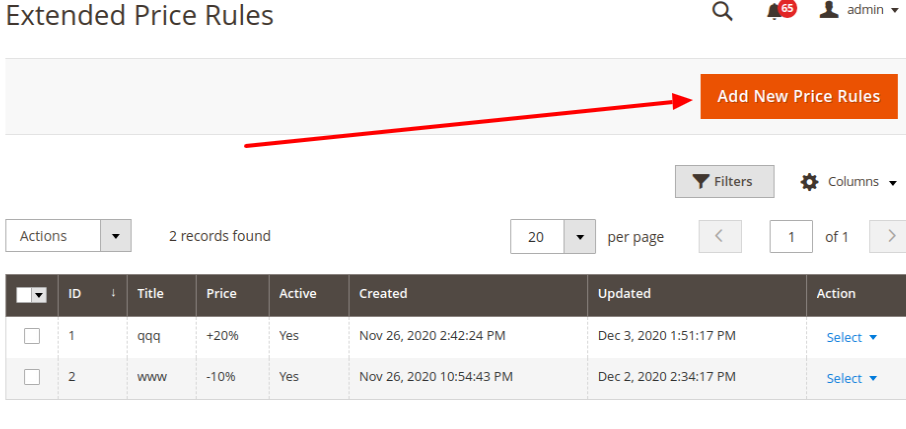
Clique no botão «Add New Price Rules».
Preencha os campos obrigatórios e salve a regra de preço.
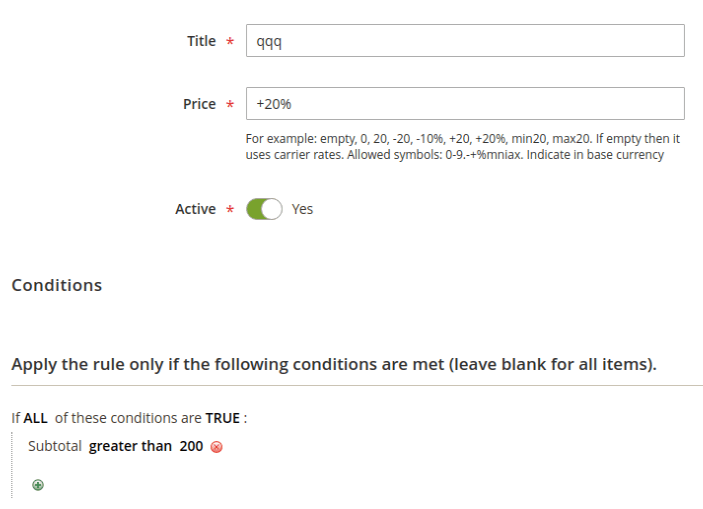
Title — o nome da regra de preço.
Price — um número ou um padrão de preço. Se for apenas um número, ele substitui o preço do método. Se for um padrão, ele é aplicado ao preço do frete.
Conditions — as condições sob as quais esta regra de preço é aplicada.
Padrões de preço
vazio: deixe vazio se não quiser aplicar nenhum preço adicional ao preço base.
0: o método passa a ser gratuito.
20: qualquer preço, exibido no lugar do preço base.
-20: um número com sinal de menos na frente reduz o preço base nesse valor.
+20: um número com sinal de mais na frente aumenta o preço base nesse valor.
-10%: menos na frente e sinal de porcentagem no fim reduzem o preço base nessa porcentagem.
+20%: mais na frente e sinal de porcentagem no fim aumentam o preço base nessa porcentagem.
max20: com o prefixo «max» o preço final fica no máximo nesse número.
min20: com o prefixo «min» o preço final fica no mínimo nesse número.
Os números 20 e 10 são apenas exemplo; pode ser qualquer número.
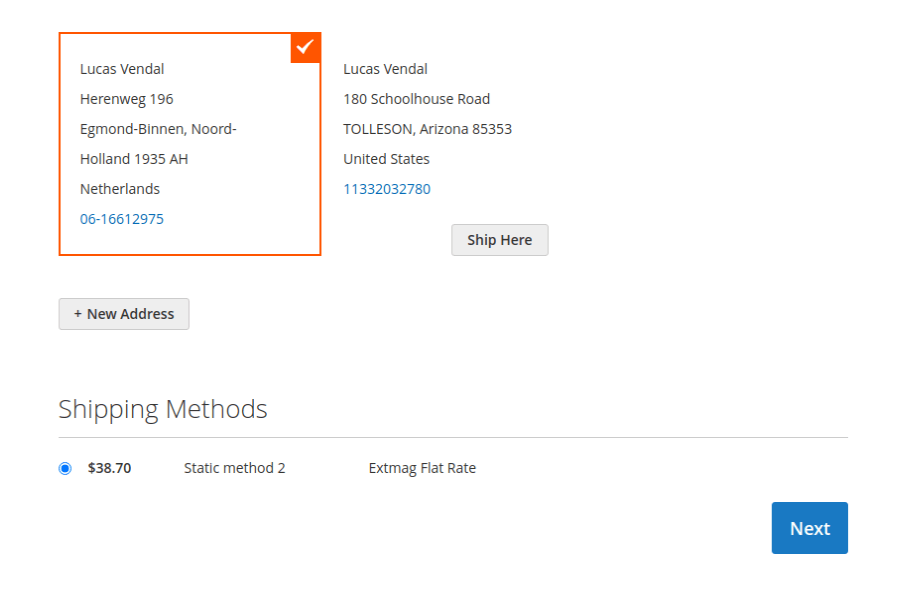
É assim que o método de envio aparece no checkout:
1.6.1
Replaced the Alpine.js x-data disabled binding with a server-rendered disabled attribute.
1.6.0
Replaced the Alpine.js x-data disabled binding with a server-rendered disabled attribute.
1.5.9
Refactored Hyva checkout shipping method list to use SecureHtmlRenderer for CSP compliance.
1.5.8
Added support Magento 2.4.9 and Adobe Commerce 2.4.9
1.5.7
Added BlackoutRules feature with admin CRUD, repository, UI components, and migration patch.
1.5.6
Added support Magento 2.4.8-p4 and Adobe Commerce 2.4.8-p4
1.5.5
Refactored code.
1.5.4
Added support Magento 2.4.8-p3 and Adobe Commerce 2.4.8-p3
1.5.3
Added support Magento 2.4.8-p2 and Adobe Commerce 2.4.8-p2
1.5.2
Added support Magento 2.4.8-p1 and Adobe Commerce 2.4.8-p1
1.5.1
Added support Magento 2.4.8 and Adobe Commerce 2.4.8
1.5.0
Added support Magento 2.4.7-p5 and Adobe Commerce 2.4.7-p5
1.4.9
Added support Magento 2.4.7-p4 and Adobe Commerce 2.4.7-p4
1.4.8
Added support Magento 2.4.7-p3 and Adobe Commerce 2.4.7-p3
1.4.7
Fixed the z-index issue on the label details page.
Added support Magento 2.4.7-p2 and Adobe Commerce 2.4.7-p2
1.4.6
Added support Magento 2.4.7-p1 and Adobe Commerce 2.4.7-p1
1.4.5
Added support Magento 2.4.7 and Adobe Commerce 2.4.7
1.4.4
Integration with Hyva Theme and Hyva Checkout has been added
1.4.3
Added support Magento 2.4.6-p4 and Adobe Commerce 2.4.6-p4
1.4.2
Improve the speed of calculating rules
1.4.1
Fixed bug with conditions for Product Attributes Combinations
1.4.0
Added support Magento 2.4.6-p3 and Adobe Commerce 2.4.6-p3
1.3.9
Added support Magento 2.4.6-p2 and Adobe Commerce 2.4.6-p2
1.3.8
Added support Adobe Commerce 2.4.6-p1
1.3.7
Support Adobe Commerce (Magento) 2.4.6
Support PHP 8.1
1.3.6
Fixed some minor bugs
1.3.5
Fixed the PHP warnings
1.3.4
Support Adobe Commerce (Magento) 2.4.5-p1
1.3.3
Support Adobe Commerce (Magento) 2.4.5
1.3.2
Fixed etc/adminhtml/di.xml and etc/di.xml
1.3.1
Fixed bug with Magento 2.3 and dependency injection
1.3.0
Added shipping method logo.
Support PHP 8.1 and Magento 2.4.4
1.2.2
Fixed deprecated PHP function array_key_exists for objects
1.2.1
Added Date and Time
Restriction for Price Rule
Reformat code with the new style
1.2.0
A new parameter "Allowed areas" have been added that allows you to show the delivery method only in the admin panel
1.1.0
Added a link to the price rule edit page from the delivery method edit page
1.0.0
Module created

