
TForce Universal Shipping para Magento® 2.x

TForce Universal Shipping es una extensión para Magento 2 con la que puede gestionar todo el ciclo de envío con TForce a través de la API de TForce.
La extensión ofrece una amplia gama de ajustes. Obtenga tarifas de envío actualizadas y cree etiquetas de envío TForce en PDF. Programe recogidas y haga seguimiento de los paquetes.
Las principales ventajas de la extensión TForce Universal Shipping:
Etiquetas de envío en PDF y BOL
La creación de etiquetas de envío es posible tanto de forma manual como automática, e incluso programada. La extensión vincula la etiqueta a un pedido, a un albarán o a un abono. Todas las etiquetas se almacenan en su servidor y pueden consultarse en todo momento desde la interfaz de administración.
Antes de la creación manual, elija el método de envío deseado entre los ofrecidos por TForce y vea al instante los costes de envío. En modo automático, las etiquetas se generan según el método elegido por el cliente o al precio mínimo/máximo de todos los métodos TForce.
Tarifas y métodos de envío
Obtenga tarifas de envío en el checkout igual que en tforcelogistics.com. Los precios de envío dependen habitualmente del seguro, el valor declarado del paquete, el peso, las dimensiones, etc. — nuestra extensión tiene en cuenta todos estos factores. El coste de un método puede ser tanto estático como dinámico. Tanto los precios como la visibilidad del método pueden ajustarse mediante límites. De forma opcional puede mostrar el método solo en el panel de administración. Puede crear tantos métodos como desee. Más detalles aquí.
Recogida y seguimiento
Solicite la recogida de paquetes directamente desde el panel de administración de su tienda online. Usted elige para qué etiquetas creadas desea solicitar una recogida y la extensión envía la petición al servicio de mensajería. En cada recogida puede ver en todo momento qué se ha enviado. Un ejemplo del documento Pickup Slips puede consultarse aquí.
Tras el envío podrá hacer seguimiento de los paquetes con nuestra extensión TForce Universal Shipping. Verá todas las paradas y la ubicación actual.
Impresión
Utilice nuestra aplicación para imprimir etiquetas en PDF en impresoras locales y en red. Puede obtenerla aquí.
Configuración
Las posibilidades de nuestro módulo son prácticamente ilimitadas gracias a sus ajustes flexibles. Al mismo tiempo, los ajustes son intuitivos y muchos vienen establecidos por defecto. Puede configurar la extensión para una tienda concreta o para un país concreto. Puede aplicar determinados ajustes a los envíos nacionales y otros a los envíos internacionales. Para cada continente pueden definirse ajustes propios.
Demo
Puede probar esta extensión durante 30 días. Solicite la demo en esta misma página con Solicitar demo; cómo funciona se explica en Pruebe una extensión durante 30 días.
Hyva Theme y Hyva Checkout
Compatible con Hyva Theme y Hyva Checkout
| CMS | Magento 2 |
|---|---|
| Compatibilidad | 2.4, 2.3 |
| Características |
|
La extensión se instala con Composer. Qué repositorio añade depende de dónde la haya comprado; la instalación en sí es la misma en ambos casos.
1. Conectar el repositorio
Comprada en extmag.com. Su página de cuenta muestra la dirección del repositorio y sus credenciales personales, junto con los dos comandos composer config que hay que pegar. Ejecútelos una vez por proyecto; a partir de ahí, todas las extensiones que posea están disponibles desde el mismo repositorio.
Comprada en el Adobe Commerce Marketplace. El paquete se sirve desde repo.magento.com, que la mayoría de las tiendas ya tienen configurado. Si no es su caso, añada las claves de acceso de su cuenta de Adobe en My Profile -> Access Keys.
2. Instalar la extensión
Ejecute en la raíz del proyecto:
composer require extmag/tforceshipping
php bin/magento setup:upgrade
php bin/magento cache:flush
Composer resuelve los paquetes compartidos de Extmag de los que depende la extensión, así que no hay nada más que requerir a mano.
Salga del admin y vuelva a entrar: la extensión está lista.
Impresión de etiquetas
Para imprimir etiquetas en una impresora local o de red, instale nuestro software de impresión desde aquí y siga después Instalación y configuración de el-Print.
Hyva Theme y Hyva Checkout
Las tiendas sobre Hyva necesitan un paquete más:
composer require extmag/shiplab-hyva
composer require magewirephp/magewire
La integración sustituye una plantilla de Hyva, view/frontend/templates/checkout/shipping/method-list.phtml. Si su tema ya sobrescribe ese archivo, combine los cambios en lugar de reemplazarlo.
Probarla antes de comprar
Puede pedir una demo de 30 días de esta extensión e instalarla exactamente como se indica arriba: mismo paquete, mismo repositorio, mismos comandos. Cómo funcionan las demos.
Instalar sin Composer
El archivo puede descomprimirse en app/code/Extmag/, pero eso deja la extensión fuera de la gestión de dependencias: sus paquetes compartidos hay que instalarlos a mano y las actualizaciones nunca le llegan. Use Composer en cualquier tienda que gestione, también en la demo.
Para cualquier duda sobre la instalación, escriba a nuestro soporte técnico.
-
User Guide User Guide.pdf · 851.1 KBDescargar
-
Reference Manual Reference Manual.pdf · 388.3 KBDescargar
-
Installation Guide Installation Guide.pdf · 217.4 KBDescargar
TForce Freight se configura desde el menú Extmag del admin de Adobe Commerce (Magento). Añada la cuenta del transportista, las direcciones desde las que envía, las cajas en las que embala y los métodos de envío que ven los clientes, y ajuste después la configuración del transportista.
Cuenta de TForce
- Si todavía no tiene credenciales de la API de TForce Freight, solicítelas en tforcefreight.com.
- Vaya a Admin Main Menu -> Extmag -> Settings -> Shipper Accounts.
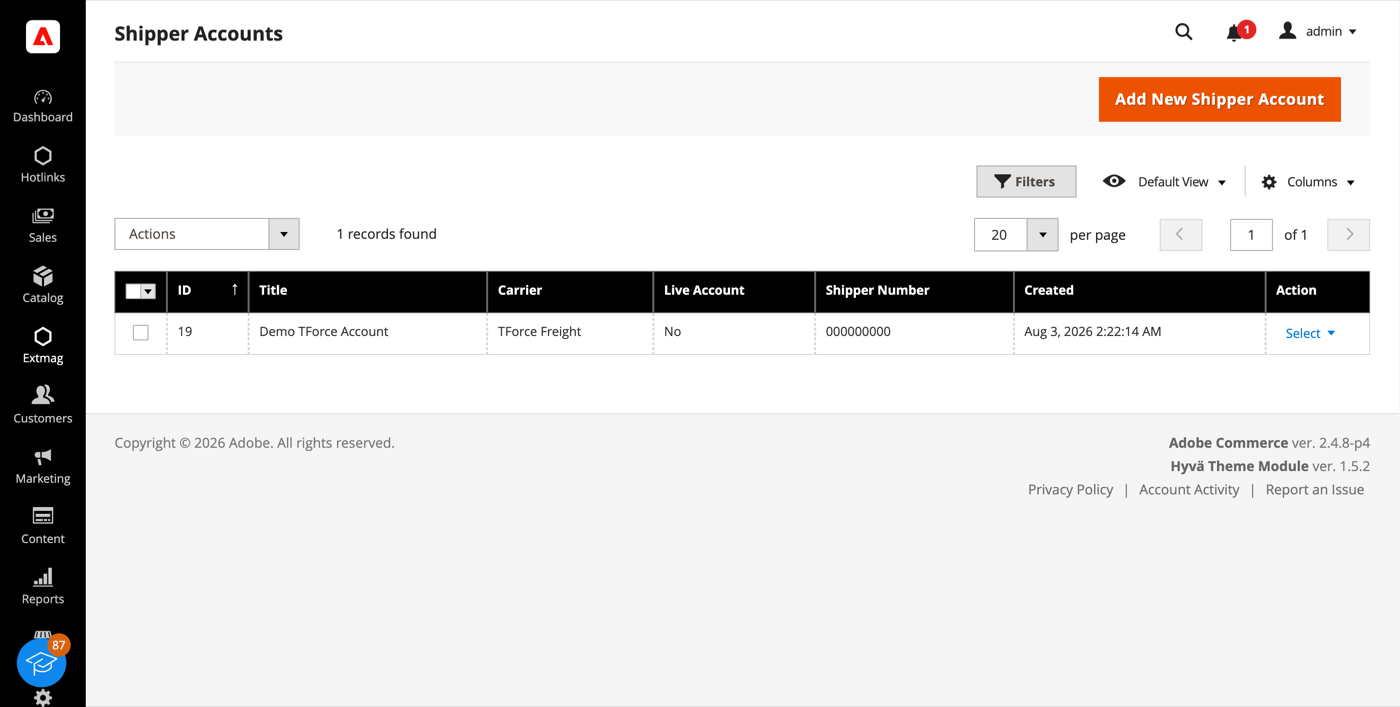
- Haga clic en el botón «Add New Shipper Account».
- Elija TForce Freight como transportista, introduzca su Client ID, Client Secret y Shipper Number y haga clic en «Save». Deje Live Account en No mientras pruebe contra el entorno de pruebas de TForce.
Direcciones
- Vaya a Admin Main Menu -> Extmag -> Settings -> Addresses.
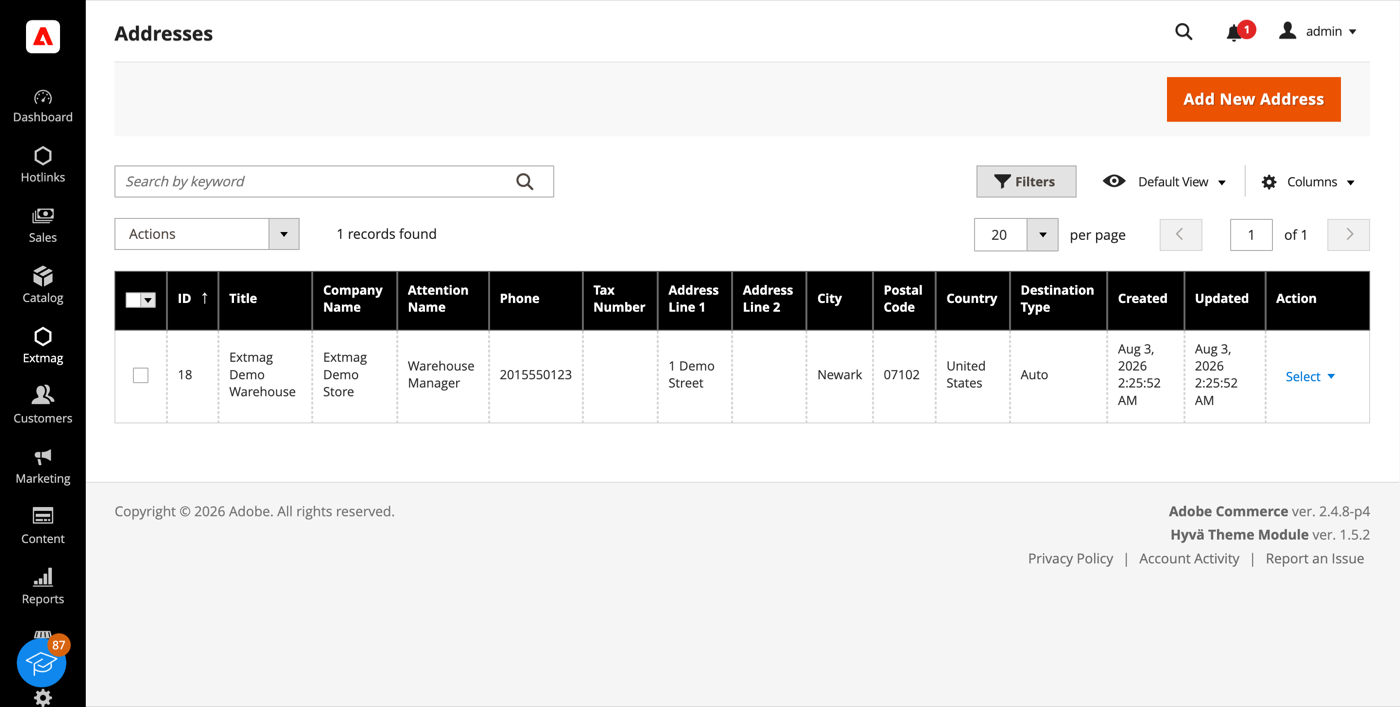
- Haga clic en el botón «Add New Address».
- Rellene el nombre de la empresa, el contacto, el teléfono y la dirección completa, y haga clic en «Save». Añada una dirección por cada ubicación desde la que envíe: la dirección de facturación y la de origen se eligen por separado.
Cajas de embalaje
- Vaya a Admin Main Menu -> Extmag -> Settings -> Package Boxes.
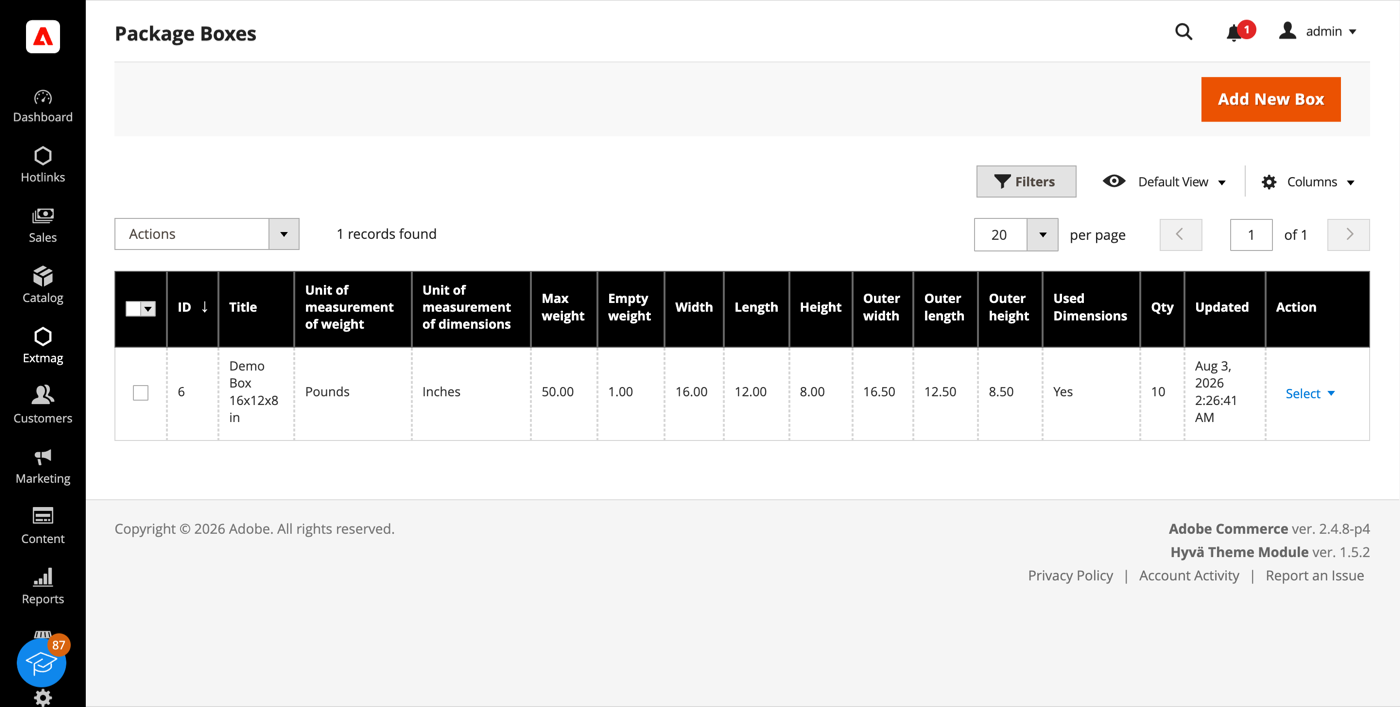
- Haga clic en el botón «Add New Box».
- Introduzca las medidas interiores y exteriores, el peso en vacío y la carga máxima, y haga clic en «Save». El empaquetador reparte el pedido entre bultos a partir de estas cajas, así que cuantas más de sus cajas reales estén dadas de alta, más se acercará la tarifa mostrada a la que le cobrarán.
Métodos de envío
- Vaya a Admin Main Menu -> Extmag -> Shipping Methods.
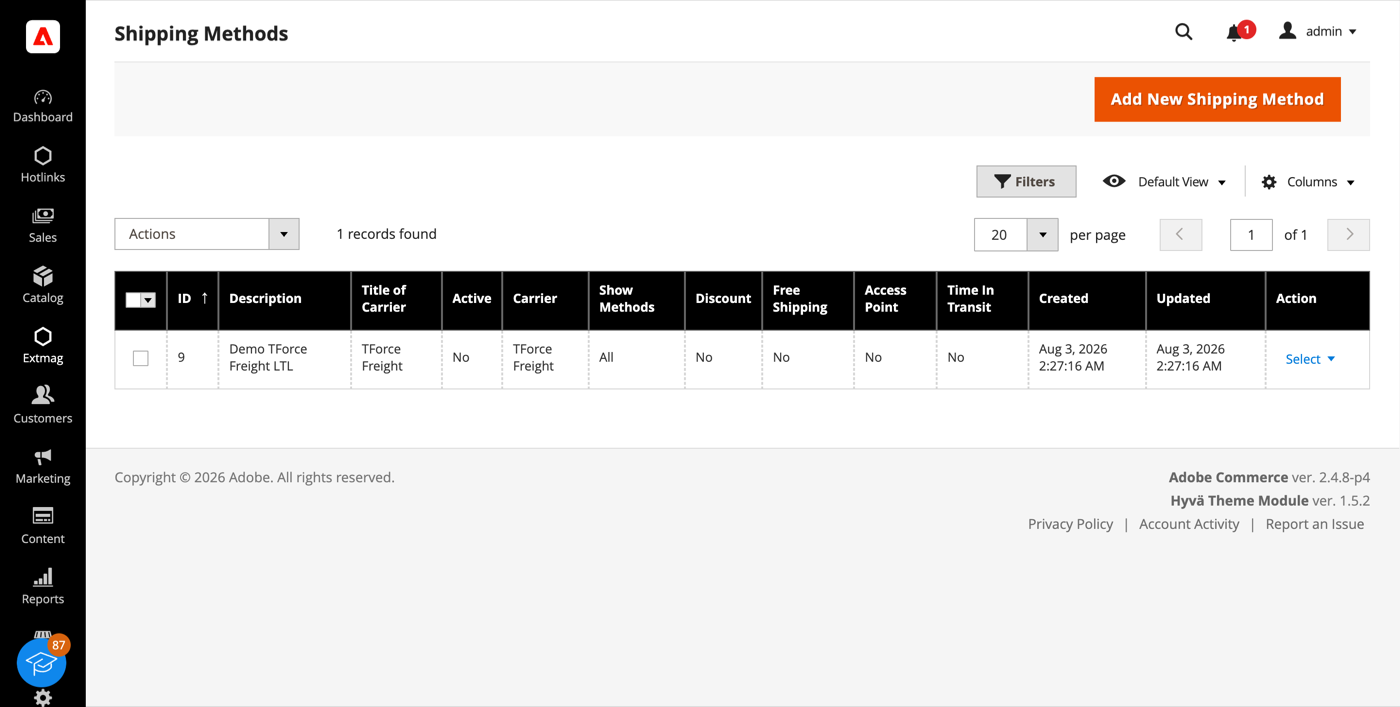
- Haga clic en el botón «Add New Shipping Method».
- Elija TForce Freight como transportista, decida qué servicios suyos mostrar —todos, una lista concreta, o solo el más barato o el más caro— y limite el método por sitio web y grupo de clientes si lo necesita. Haga clic en «Save».
Configuración
- Vaya a Admin Main Menu -> Extmag -> Settings -> TForce Configuration.
- Abra primero la pestaña General y seleccione la cuenta de expedidor, la dirección de facturación y la dirección de origen que creó arriba.
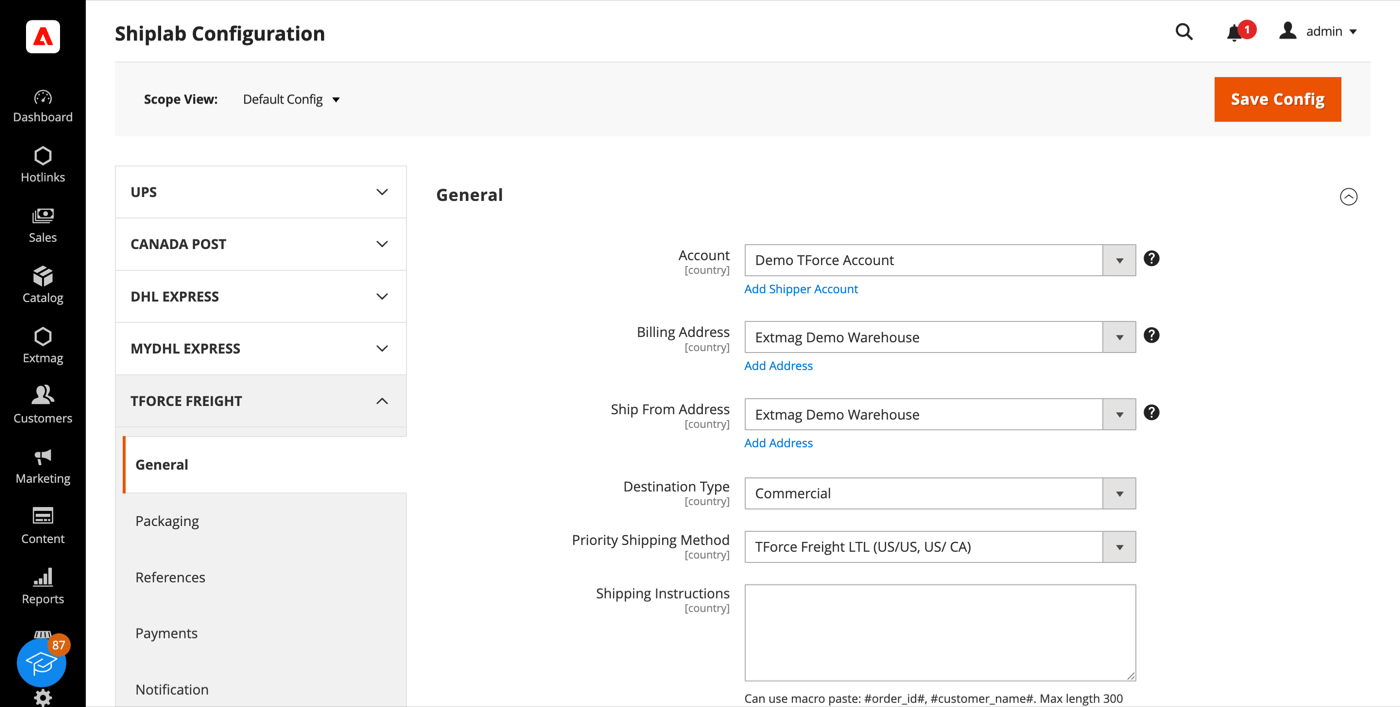
- Recorra las pestañas restantes rellenando lo que corresponda a su cuenta.
Las pestañas cubren:
- General — cuenta, direcciones, tipo de destino, método de envío prioritario e instrucciones de envío.
- Packaging — tipo de unidad de manipulación, tipo de embalaje, clase de flete y código de mercancía NMFC.
- References — los números de referencia que se escriben en el Bill of Lading y sus códigos de barras.
- Payments — a quién se factura el envío y los datos de la cuenta del pagador.
- Notification — los eventos de los que avisa TForce y sus destinatarios.
- Printing — formatos de documento e impresora usada para cada tipo.
- Pickups — si las recogidas se reservan automáticamente tras crear una etiqueta o se planifican a mano.
- Tracking — cada cuánto se consultan los bultos y cómo se escriben los estados en el pedido.
- Automatic, Mass Actions y Manual Actions — cuándo se crean etiquetas sin operador, en lote desde la rejilla de pedidos, o de una en una.
- Other Options — registro y el resto de interruptores a nivel de transportista.
Cada ajuste puede aplicarse por sitio web y por país de destino, de modo que una regla que solo tiene sentido en un mercado no afecta a los demás.
La referencia completa campo por campo, con las rutas de configuración exactas, está en el Reference Manual que acompaña a la extensión.
1.3.1
Shiplab: Replace raw filesystem calls in settings import with Magento file driver.
1.3.0
Shiplab: Replace raw filesystem calls in settings import with Magento file driver.
1.2.9
Shiplab: Added support for multiple label files per tracking number with -N suffix.
1.2.8
Shiplab: Added zero-weight guard and weight diagnostics for shipping rate calculation. Shiplab: Removed legacy Additional Price fields and migrated data to price rules.
1.2.7
Shiplab: Replaced multiselect categories with AJAX tree chooser in dimension config. Added support Magento 2.4.9 and Adobe Commerce 2.4.9
1.2.6
Shiplab: Fixed attribute ID retrieval order in category EAV setup patch.
1.2.5
Shiplab: Added response post-processing hook and fixed logo data handling.
1.2.4
Shiplab: Added BlackoutRules feature with full CRUD, date picker mixin, and schedule migration.
1.2.3
Fixed service array initialization in Rate response parser. Shiplab: Fixed null safety issues and added numeric attribute validation. Added support Magento 2.4.8-p4 and Adobe Commerce 2.4.8-p4
1.2.2
Fixed service code resolution to preserve value set during step three.
1.2.1
Optimized the algorithms for packing items into boxes to ensure better efficiency.
1.2.0
Fixed bundle product handling for Ship Separately/Together and price/weight types.
Added config option to include zero-price bundle children in international invoices.
Fixed property type declarations for PHP 8.x compatibility.
1.1.9
Fixed loadedData check in DataProvider classes for PHP 8.x compatibility.
Fixed place order callback to pass data for proper Braintree payment handling.
1.1.8
Added support for PHP 8.4
1.1.7
Added support Magento 2.4.8-p3 and Adobe Commerce 2.4.8-p3
1.1.6
Added support Magento 2.4.8-p2 and Adobe Commerce 2.4.8-p2
1.1.5
Added support Magento 2.4.8-p1 and Adobe Commerce 2.4.8-p1
1.1.4
Added support Magento 2.4.8 and Adobe Commerce 2.4.8
1.1.3
Fixed a bug when the order has only virtual products
1.1.2
Added support Magento 2.4.7-p5 and Adobe Commerce 2.4.7-p5
1.1.1
Added support Magento 2.4.7-p4 and Adobe Commerce 2.4.7-p4
1.1.0
Added new shipping method TForce Freight Accelerated Guaranteed
1.0.9
Fixed a bug with SplitButton for the order view page in the admin panel
1.0.8
Added support Magento 2.4.7-p3 and Adobe Commerce 2.4.7-p3
1.0.7
Fixed the price format on the label creation page in the admin panel.
Improved the integration with the Hyva Theme.
1.0.6
Added email templates for Access Point address.
Fixed Tracking.php.
Fixed logs with config_snapshot.
Fixed zero baseSubTotal.
1.0.5
Fixed a bug with division by zero
1.0.4
Fixed a bug with a recursive function for shipping rates
1.0.3
Fixed a bug with shipping rates debugging.
Fixed CSP for printing by websocket.
1.0.2
Fixed bug with afterGetAPIUrl plugin
1.0.1
Added support Magento 2.4.7-p2 and Adobe Commerce 2.4.7-p2
1.0.0
The extension was created
