
TForce Universalversand für Magento® 2.x

TForce Universal Shipping ist eine Magento-2-Erweiterung, mit der Sie den kompletten TForce-Versand-Zyklus über die TForce API verwalten.
Die Erweiterung bietet eine breite Palette an Einstellungen. Holen Sie aktuelle Versandpreise ein und erstellen Sie PDF-TForce-Versandetiketten. Legen Sie Abholungen an und verfolgen Sie Pakete.
Die wichtigsten Vorteile der TForce Universal Shipping Erweiterung:
PDF-Versandetiketten und BOL
Die Erstellung von Versandetiketten ist sowohl manuell als auch automatisch und sogar geplant möglich. Die Erweiterung verknüpft das Etikett mit einer Bestellung, einer Lieferung oder einer Gutschrift. Alle Etiketten werden auf Ihrem Server gespeichert und sind jederzeit über das Admin-Interface erreichbar.
Vor der manuellen Erstellung wählen Sie die gewünschte Versandmethode aus den von TForce angebotenen und sehen sofort die Versandkosten. Im Automatikmodus werden Etiketten gemäß der vom Kunden gewählten Methode oder zum minimalen/maximalen Preis aller TForce-Methoden erzeugt.
Versandtarife & Versandmethoden
Erhalten Sie Versandtarife im Checkout wie auf tforcelogistics.com. Versandpreise hängen üblicherweise von Versicherung, deklariertem Paketwert, Gewicht, Abmessungen usw. ab — alle Punkte berücksichtigt unsere Erweiterung. Die Kosten einer Methode können sowohl statisch als auch dynamisch sein. Sowohl Preise als auch die Anzeige der Methode lassen sich über Limits anpassen. Optional zeigen Sie die Methode nur im Admin-Panel. Sie erstellen beliebig viele Methoden. Mehr Details hier.
Abholung und Tracking
Bestellen Sie die Paketabholung direkt aus dem Admin-Panel Ihres Online-Shops. Sie wählen, für welche erstellten Etiketten eine Abholung bestellt werden soll, und die Erweiterung sendet die Anfrage an den Zustelldienst. In jeder Abholung sehen Sie jederzeit, was verschickt wurde. Ein Beispiel-Pickup-Slips-Dokument sehen Sie hier.
Nach Versand verfolgen Sie Pakete mit unserer TForce Universal Shipping Erweiterung. Sie sehen alle Stationen und den aktuellen Standort.
Druck
Nutzen Sie unsere App, um PDF-Etiketten auf lokalen und Netzwerkdruckern zu drucken. Sie erhalten sie hier.
Konfiguration
Die Möglichkeiten unseres Moduls sind dank flexibler Einstellungen praktisch unbegrenzt. Gleichzeitig sind die Einstellungen intuitiv und viele sind standardmäßig gesetzt. Sie konfigurieren die Erweiterung für einen bestimmten Store oder ein bestimmtes Land. Sie wenden bestimmte Einstellungen auf Inlandssendungen an und andere auf Auslandssendungen. Für jeden Kontinent lassen sich eigene Einstellungen festlegen.
Demo
Sie können diese Erweiterung 30 Tage lang testen. Die Demo fordern Sie direkt auf dieser Seite über Demo anfordern an; wie das abläuft, steht unter Eine Erweiterung 30 Tage lang testen.
Hyva Theme und Hyva Checkout
Kompatibel mit Hyva Theme und Hyva Checkout
| CMS | Magento 2 |
|---|---|
| Kompatibilität | 2.4, 2.3 |
| Funktionen |
|
Die Erweiterung wird mit Composer installiert. Welches Repository Sie einbinden, hängt davon ab, wo Sie sie gekauft haben — die Installation selbst ist in beiden Fällen dieselbe.
1. Repository einbinden
Auf extmag.com gekauft. Ihre Kontoseite zeigt die Repository-Adresse und Ihre persönlichen Zugangsdaten samt den beiden composer config-Befehlen zum Einfügen. Führen Sie sie einmal pro Projekt aus; danach steht jede Erweiterung, die Sie besitzen, aus demselben Repository zur Verfügung.
Auf dem Adobe Commerce Marketplace gekauft. Das Paket wird von repo.magento.com ausgeliefert, das in den meisten Shops bereits eingerichtet ist. Falls nicht, tragen Sie die Access Keys aus Ihrem Adobe-Konto unter My Profile -> Access Keys ein.
2. Erweiterung installieren
Im Projektverzeichnis ausführen:
composer require extmag/tforceshipping
php bin/magento setup:upgrade
php bin/magento cache:flush
Composer löst die gemeinsam genutzten Extmag-Pakete auf, von denen die Erweiterung abhängt — von Hand ist nichts weiter zu fordern.
Melden Sie sich vom Admin ab und wieder an, dann ist die Erweiterung einsatzbereit.
Etikettendruck
Um Etiketten auf einem lokalen oder Netzwerkdrucker zu drucken, installieren Sie unsere Drucksoftware von hier und folgen Sie danach Installation und Konfiguration von el-Print.
Hyva Theme und Hyva Checkout
Shops auf Hyva brauchen ein Paket mehr:
composer require extmag/shiplab-hyva
composer require magewirephp/magewire
Die Integration ersetzt ein Hyva-Template, view/frontend/templates/checkout/shipping/method-list.phtml. Überschreibt Ihr Theme diese Datei bereits, führen Sie die Änderungen zusammen, statt sie zu ersetzen.
Vor dem Kauf ausprobieren
Sie können eine 30-Tage-Demo dieser Erweiterung anfordern und sie genau wie oben installieren — gleiches Paket, gleiches Repository, gleiche Befehle. Wie Demos funktionieren.
Installation ohne Composer
Das Archiv lässt sich stattdessen nach app/code/Extmag/ entpacken, doch damit steht die Erweiterung außerhalb der Abhängigkeitsverwaltung: Ihre gemeinsam genutzten Pakete müssen von Hand installiert werden und Updates erreichen sie nie. Nutzen Sie für jeden Shop, den Sie betreiben, Composer — auch für die Demo.
Bei Fragen zur Installation wenden Sie sich bitte an unseren technischen Support.
-
User Guide User Guide.pdf · 851.1 KBHerunterladen
-
Reference Manual Reference Manual.pdf · 388.3 KBHerunterladen
-
Installation Guide Installation Guide.pdf · 217.4 KBHerunterladen
TForce Freight wird über das Extmag-Menü im Adobe-Commerce-(Magento-)Admin eingerichtet. Legen Sie das Carrier-Konto an, die Adressen, von denen Sie versenden, die Kartons, in die Sie packen, und die Versandmethoden, die Kunden sehen — und stimmen Sie danach die Carrier-Konfiguration ab.
TForce-Konto
- Wenn Sie noch keine API-Zugangsdaten für TForce Freight haben, fordern Sie sie bei tforcefreight.com an.
- Gehen Sie zu Admin Main Menu -> Extmag -> Settings -> Shipper Accounts.
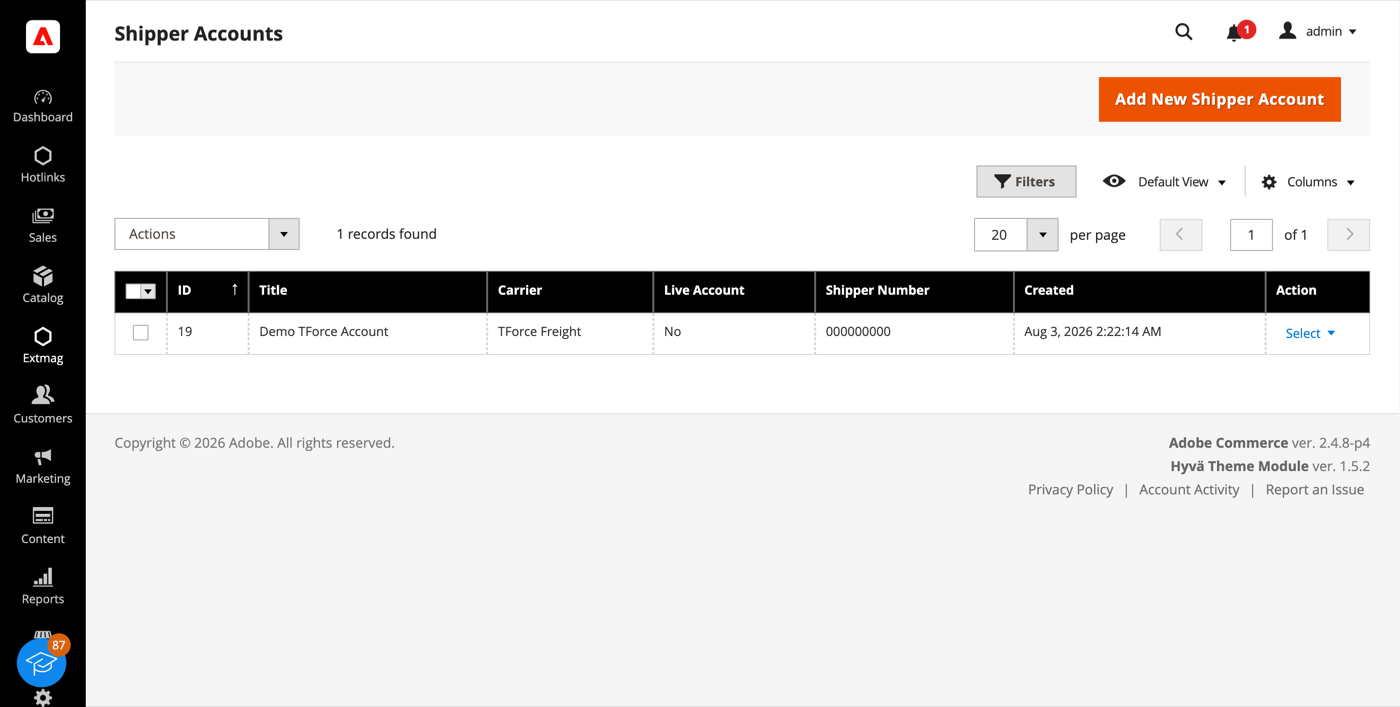
- Klicken Sie auf die Schaltfläche „Add New Shipper Account“.
- Wählen Sie TForce Freight als Carrier, tragen Sie Client ID, Client Secret und Shipper Number ein und klicken Sie auf „Save“. Lassen Sie Live Account auf No, solange Sie gegen die TForce-Sandbox testen.
Adressen
- Gehen Sie zu Admin Main Menu -> Extmag -> Settings -> Addresses.
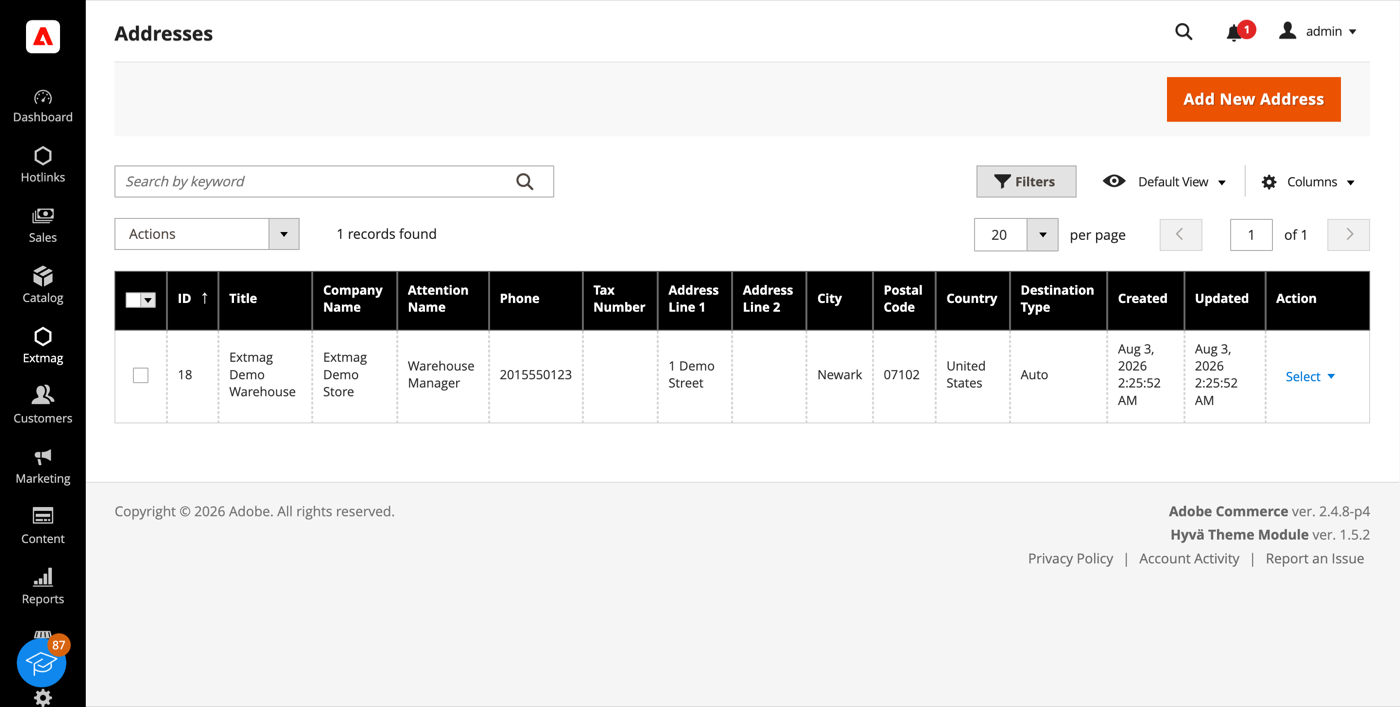
- Klicken Sie auf die Schaltfläche „Add New Address“.
- Füllen Sie Firmenname, Ansprechpartner, Telefon und vollständige Adresse aus und klicken Sie auf „Save“. Legen Sie eine Adresse je Standort an, von dem Sie versenden — Rechnungsadresse und Versandadresse werden getrennt ausgewählt.
Verpackungskartons
- Gehen Sie zu Admin Main Menu -> Extmag -> Settings -> Package Boxes.
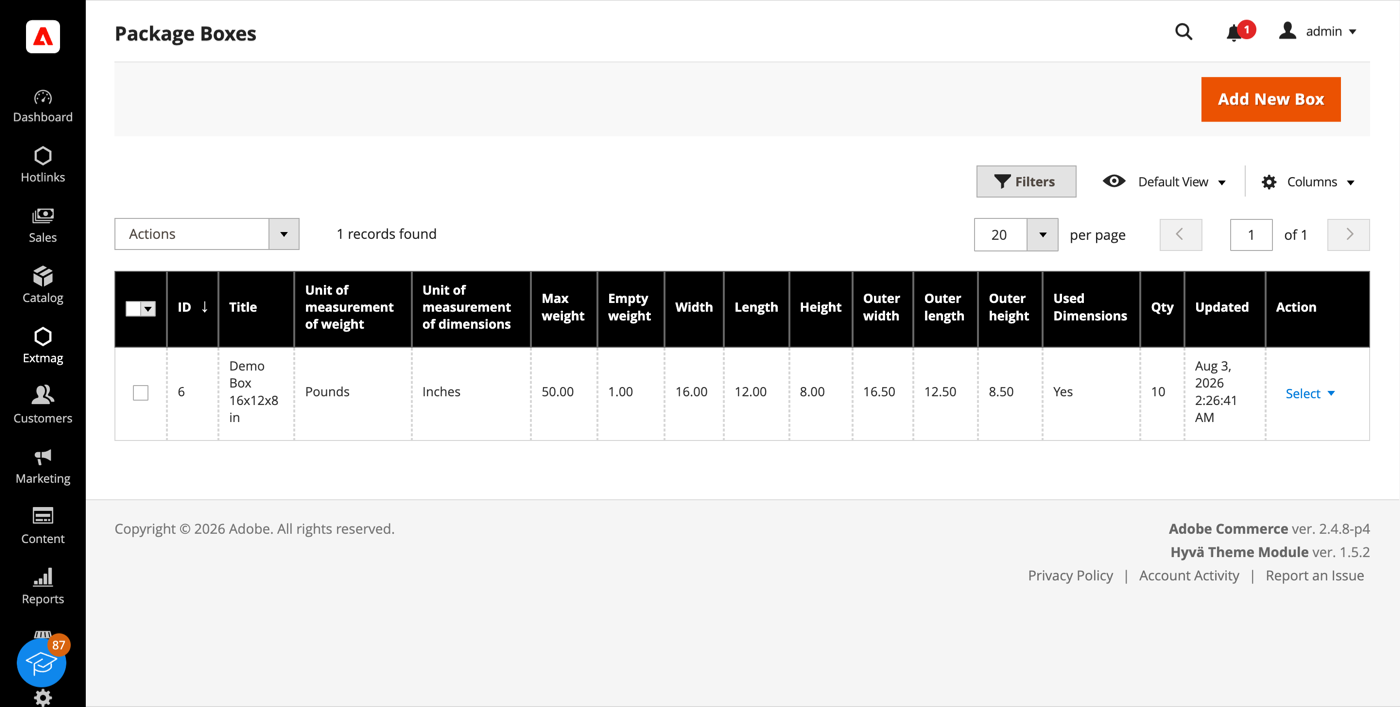
- Klicken Sie auf die Schaltfläche „Add New Box“.
- Tragen Sie Innen- und Außenmaße, Leergewicht und maximale Zuladung ein und klicken Sie auf „Save“. Der Packer verteilt eine Bestellung anhand dieser Kartons auf Pakete — je mehr Ihrer echten Kartons hinterlegt sind, desto näher liegt der angezeigte Preis an dem, was Ihnen berechnet wird.
Versandmethoden
- Gehen Sie zu Admin Main Menu -> Extmag -> Shipping Methods.
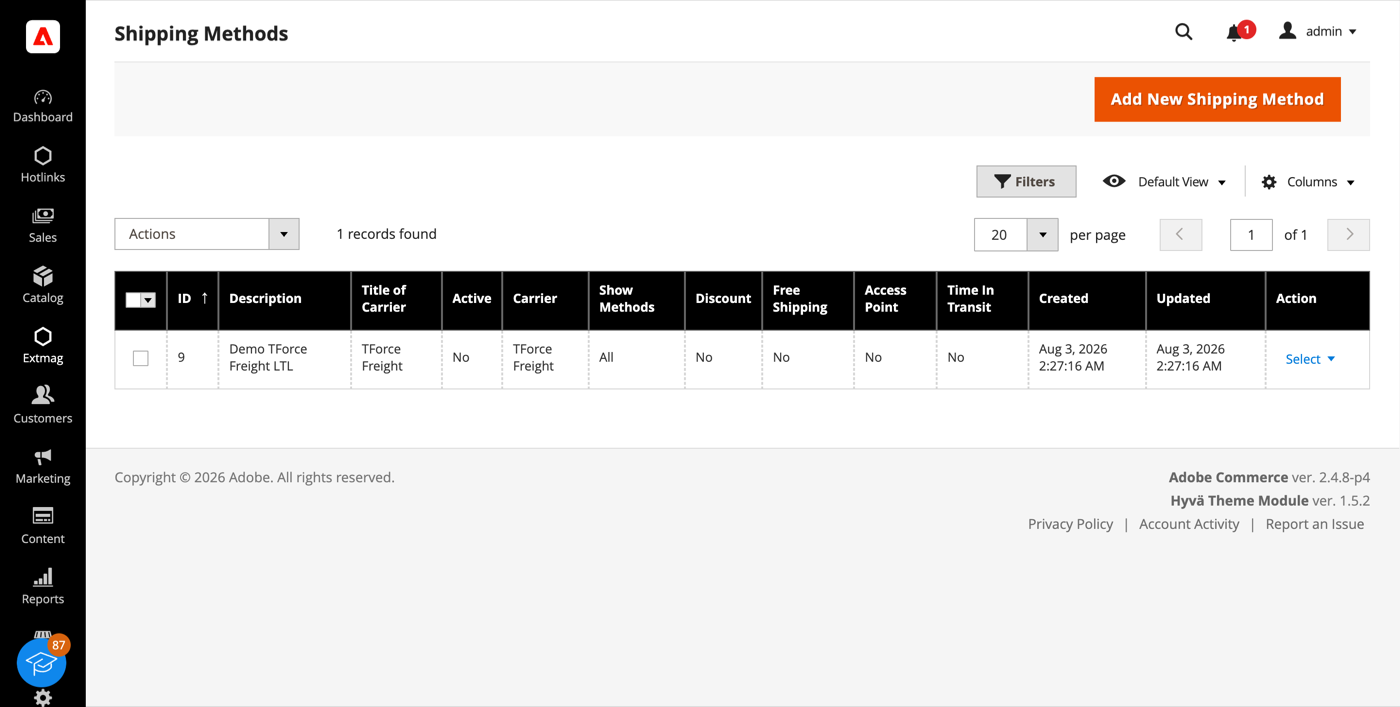
- Klicken Sie auf die Schaltfläche „Add New Shipping Method“.
- Wählen Sie TForce Freight als Carrier, entscheiden Sie, welche seiner Services angezeigt werden — alle, eine bestimmte Auswahl oder nur der günstigste beziehungsweise teuerste — und schränken Sie die Methode bei Bedarf nach Website und Kundengruppe ein. Klicken Sie auf „Save“.
Konfiguration
- Gehen Sie zu Admin Main Menu -> Extmag -> Settings -> TForce Configuration.
- Öffnen Sie zuerst den Reiter General und wählen Sie das Versenderkonto, die Rechnungsadresse und die Versandadresse aus, die Sie oben angelegt haben.
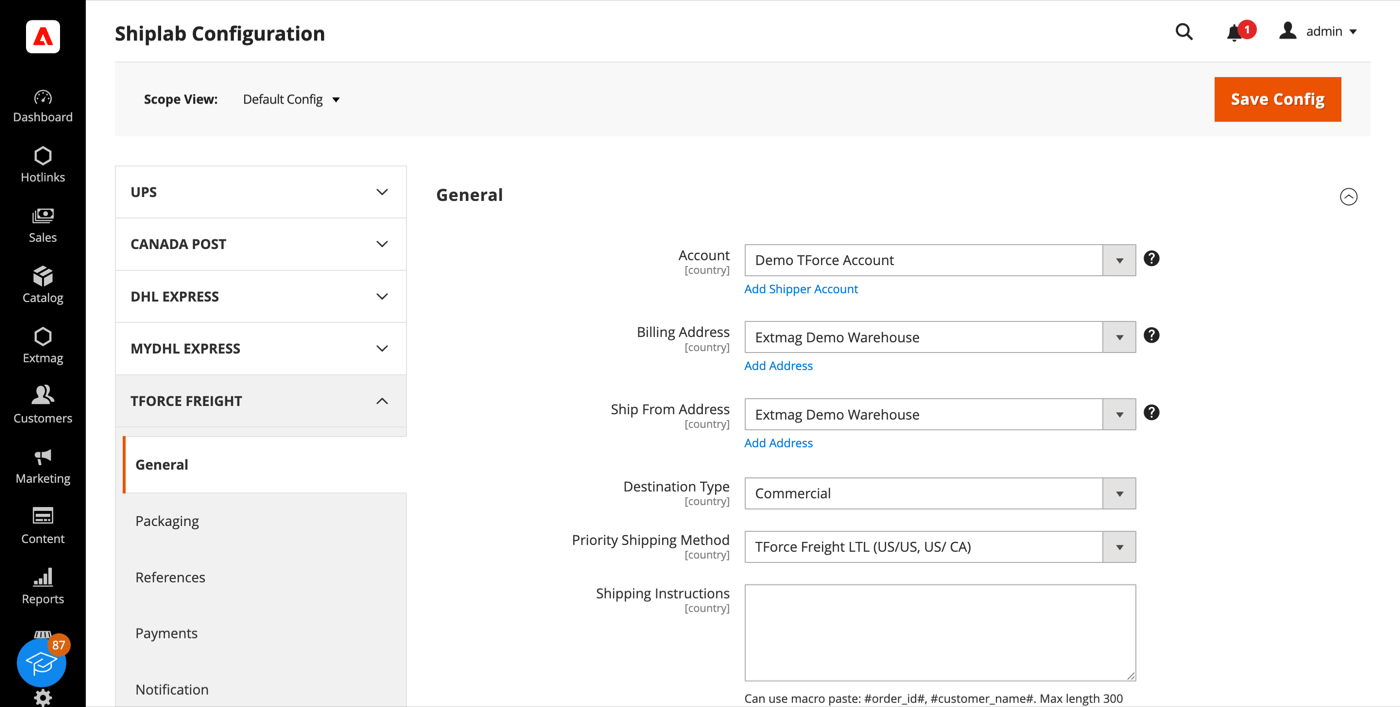
- Arbeiten Sie die übrigen Reiter durch und füllen Sie aus, was auf Ihr Konto zutrifft.
Die Reiter im Einzelnen:
- General — Konto, Adressen, Zielart, bevorzugte Versandmethode und Versandhinweise.
- Packaging — Handling-Unit-Typ, Verpackungsart, Frachtklasse und NMFC-Warennummer.
- References — die Referenznummern, die auf das Bill of Lading geschrieben werden, und ihre Barcodes.
- Payments — wer die Sendung bezahlt und die Kontodaten des Zahlers.
- Notification — die Ereignisse, über die TForce benachrichtigt, und die Empfänger.
- Printing — Dokumentformate und der Drucker je Dokumenttyp.
- Pickups — ob Abholungen nach der Etikettenerstellung automatisch gebucht oder manuell geplant werden.
- Tracking — wie oft Pakete abgefragt werden und wie Status zurück in die Bestellung geschrieben werden.
- Automatic, Mass Actions und Manual Actions — wann Etiketten ohne Bediener, in großer Zahl aus dem Bestellraster oder einzeln erzeugt werden.
- Other Options — Logging und die übrigen Schalter auf Carrier-Ebene.
Jede Einstellung lässt sich je Website und je Zielland anwenden, sodass eine Regel, die nur für einen Markt sinnvoll ist, die übrigen nicht berührt.
Die vollständige Referenz Feld für Feld, samt der genauen Konfigurationspfade, steht im Reference Manual, das der Erweiterung beiliegt.
1.3.1
Shiplab: Replace raw filesystem calls in settings import with Magento file driver.
1.3.0
Shiplab: Replace raw filesystem calls in settings import with Magento file driver.
1.2.9
Shiplab: Added support for multiple label files per tracking number with -N suffix.
1.2.8
Shiplab: Added zero-weight guard and weight diagnostics for shipping rate calculation. Shiplab: Removed legacy Additional Price fields and migrated data to price rules.
1.2.7
Shiplab: Replaced multiselect categories with AJAX tree chooser in dimension config. Added support Magento 2.4.9 and Adobe Commerce 2.4.9
1.2.6
Shiplab: Fixed attribute ID retrieval order in category EAV setup patch.
1.2.5
Shiplab: Added response post-processing hook and fixed logo data handling.
1.2.4
Shiplab: Added BlackoutRules feature with full CRUD, date picker mixin, and schedule migration.
1.2.3
Fixed service array initialization in Rate response parser. Shiplab: Fixed null safety issues and added numeric attribute validation. Added support Magento 2.4.8-p4 and Adobe Commerce 2.4.8-p4
1.2.2
Fixed service code resolution to preserve value set during step three.
1.2.1
Optimized the algorithms for packing items into boxes to ensure better efficiency.
1.2.0
Fixed bundle product handling for Ship Separately/Together and price/weight types.
Added config option to include zero-price bundle children in international invoices.
Fixed property type declarations for PHP 8.x compatibility.
1.1.9
Fixed loadedData check in DataProvider classes for PHP 8.x compatibility.
Fixed place order callback to pass data for proper Braintree payment handling.
1.1.8
Added support for PHP 8.4
1.1.7
Added support Magento 2.4.8-p3 and Adobe Commerce 2.4.8-p3
1.1.6
Added support Magento 2.4.8-p2 and Adobe Commerce 2.4.8-p2
1.1.5
Added support Magento 2.4.8-p1 and Adobe Commerce 2.4.8-p1
1.1.4
Added support Magento 2.4.8 and Adobe Commerce 2.4.8
1.1.3
Fixed a bug when the order has only virtual products
1.1.2
Added support Magento 2.4.7-p5 and Adobe Commerce 2.4.7-p5
1.1.1
Added support Magento 2.4.7-p4 and Adobe Commerce 2.4.7-p4
1.1.0
Added new shipping method TForce Freight Accelerated Guaranteed
1.0.9
Fixed a bug with SplitButton for the order view page in the admin panel
1.0.8
Added support Magento 2.4.7-p3 and Adobe Commerce 2.4.7-p3
1.0.7
Fixed the price format on the label creation page in the admin panel.
Improved the integration with the Hyva Theme.
1.0.6
Added email templates for Access Point address.
Fixed Tracking.php.
Fixed logs with config_snapshot.
Fixed zero baseSubTotal.
1.0.5
Fixed a bug with division by zero
1.0.4
Fixed a bug with a recursive function for shipping rates
1.0.3
Fixed a bug with shipping rates debugging.
Fixed CSP for printing by websocket.
1.0.2
Fixed bug with afterGetAPIUrl plugin
1.0.1
Added support Magento 2.4.7-p2 and Adobe Commerce 2.4.7-p2
1.0.0
The extension was created
