
Erweiterte Versandtarife Pro für Magento® 2.x


Möchten Sie die Versandkosten je nach Region, Datum, Feiertagen, Rabatten usw. vollständig kontrollieren? Das Modul „Erweiterte Versandtarife Pro" für Magento 2 hilft Ihnen dabei.
Unser Modul benötigt keine zusätzlichen Module, um Versandmethoden auf der Checkout-Seite zu filtern oder einzuschränken. Es erstellt eigene Regeln für die Anzeige seiner Versandmethoden.
Neue Funktion: Preisänderung anhand von Regeln. Sie erstellen in einer Versandmethode unbegrenzt viele Preisregeln. Beispiel: Versandkosten zu Feiertagen 10 % günstiger, zu Neujahr 20 %. Unser Modul erledigt das mühelos. Sie geben außerdem Einschränkungen für Gewicht, den Gesamtpreis des Warenkorbs, den Preis eines beliebigen Artikels usw. an. Die Anzahl der Regelkombinationen erreicht mehrere Hundert.
Mit unserem Modul haben Sie wirklich grenzenlose Kontrolle über Versandmethoden und -kosten. Außerdem ist das Modul vollständig kompatibel mit allen unseren Magento-2-Modulen.
Demo
Sie können diese Erweiterung 30 Tage lang testen. Die Demo fordern Sie direkt auf dieser Seite über Demo anfordern an; wie das abläuft, steht unter Eine Erweiterung 30 Tage lang testen.
| CMS | Magento 2 |
|---|---|
| Kompatibilität | 2.4, 2.3 |
| Funktionen |
|
Die Erweiterung wird mit Composer installiert. Welches Repository Sie einbinden, hängt davon ab, wo Sie sie gekauft haben — die Installation selbst ist in beiden Fällen dieselbe.
1. Repository einbinden
Auf extmag.com gekauft. Ihre Kontoseite zeigt die Repository-Adresse und Ihre persönlichen Zugangsdaten samt den beiden composer config-Befehlen zum Einfügen. Führen Sie sie einmal pro Projekt aus; danach steht jede Erweiterung, die Sie besitzen, aus demselben Repository zur Verfügung.
Auf dem Adobe Commerce Marketplace gekauft. Das Paket wird von repo.magento.com ausgeliefert, das in den meisten Shops bereits eingerichtet ist. Falls nicht, tragen Sie die Access Keys aus Ihrem Adobe-Konto unter My Profile -> Access Keys ein.
2. Erweiterung installieren
Im Projektverzeichnis ausführen:
composer require extmag/extendedratespro
php bin/magento setup:upgrade
php bin/magento cache:flush
Composer löst die gemeinsam genutzten Extmag-Pakete auf, von denen die Erweiterung abhängt — von Hand ist nichts weiter zu fordern.
Melden Sie sich vom Admin ab und wieder an, dann ist die Erweiterung einsatzbereit.
Vor dem Kauf ausprobieren
Sie können eine 30-Tage-Demo dieser Erweiterung anfordern und sie genau wie oben installieren — gleiches Paket, gleiches Repository, gleiche Befehle. Wie Demos funktionieren.
Installation ohne Composer
Das Archiv lässt sich stattdessen nach app/code/Extmag/ entpacken, doch damit steht die Erweiterung außerhalb der Abhängigkeitsverwaltung: Ihre gemeinsam genutzten Pakete müssen von Hand installiert werden und Updates erreichen sie nie. Nutzen Sie für jeden Shop, den Sie betreiben, Composer — auch für die Demo.
Bei Fragen zur Installation wenden Sie sich bitte an unseren technischen Support.
-
User Guide User Guide.pdf · 795.7 KBHerunterladen
-
Reference Manual Reference Manual.pdf · 433.6 KBHerunterladen
-
Installation Guide Installation Guide.pdf · 270.6 KBHerunterladen
Konfiguration
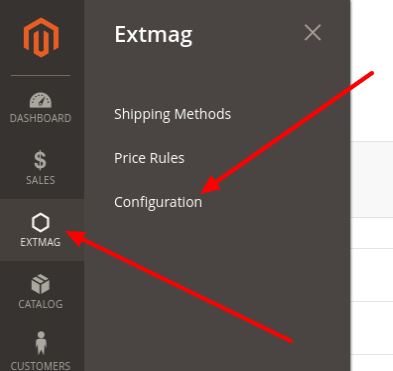
Zum Einrichten der Erweiterung gehen Sie zu Extmag -> Extended Shipping Rates -> Configuration.
In der Gruppe Extended Shipping Rates schalten Sie das Modul ein und füllen den Titel aus. Der Titel lässt sich je Versandmethode überschreiben.

Läuft Ihr Shop im Entwicklermodus, setzen Sie Debug auf Yes.
Versandmethoden lassen sich bei Bedarf importieren und exportieren.
Versandmethoden anlegen
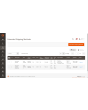
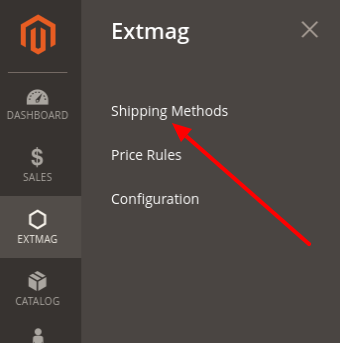
Zum Anlegen einer Versandmethode gehen Sie zu Extmag -> Extended Shipping Rates -> Shipping Methods.
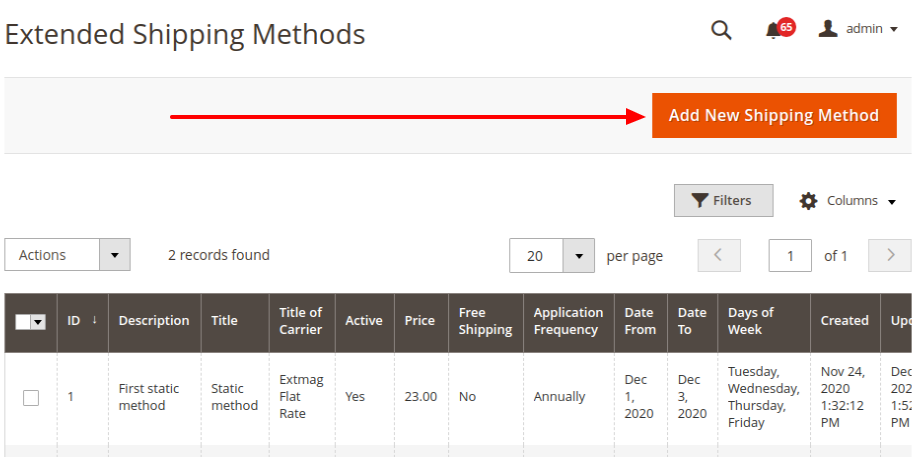
Klicken Sie auf die Schaltfläche „Add New Shipping Method“.
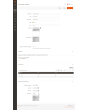
Füllen Sie die Pflichtfelder aus und speichern Sie die Versandmethode.
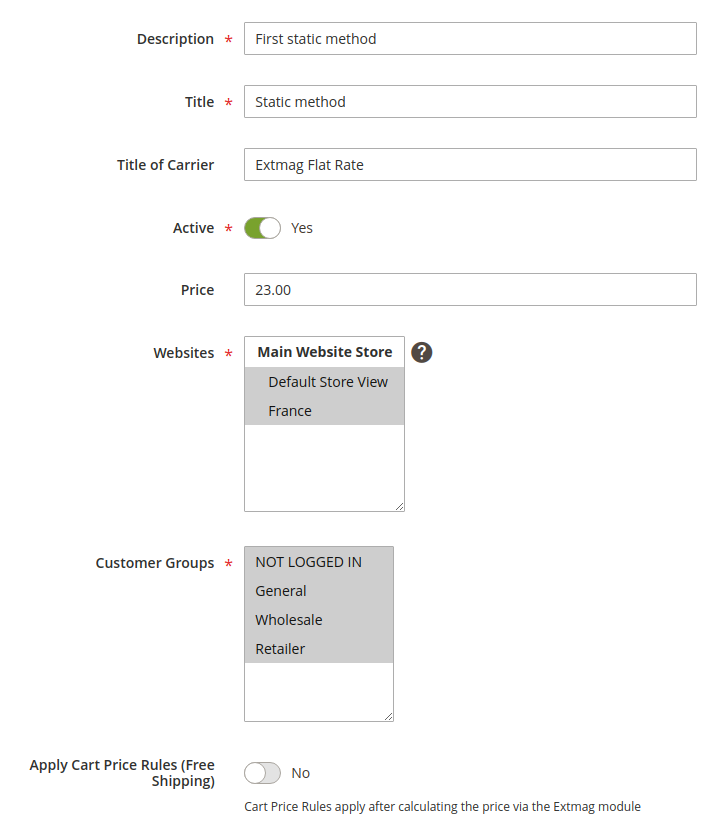
Description — Beschreibung der Versandmethode für den Administrator. Sie muss eindeutig sein.
Title — Der Name der Versandmethode, den der Käufer beim Bestellen im Versandschritt sieht.
Title of Carrier — Der Name des Carriers. Das Feld überschreibt die Einstellung Title aus der Modulkonfiguration.
Active — Schaltet die Versandmethode im Checkout ein oder aus.
Price — Der Versandpreis.
Websites — Die Shops, für die diese Methode gilt.
Customer Groups — Die Kundengruppen, für die diese Methode gilt.
Apply Cart Price Rules (Free Shipping) — Haben Sie Warenkorbregeln für kostenlosen Versand eingerichtet und möchten sie auf diese Methode anwenden, schalten Sie die Option ein.
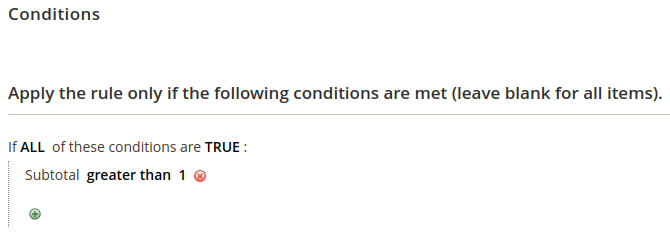
Conditions — Regeln dafür, wann die Versandmethode im Checkout erscheint — nach vielen Parametern und in beliebiger Zahl.
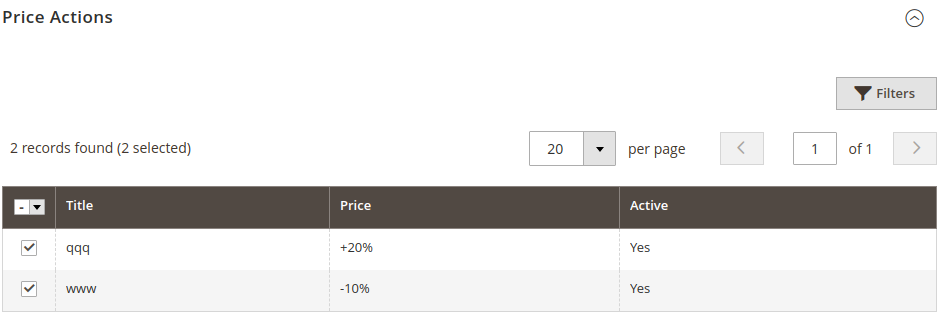
Price Actions — Regeln für die Bildung des Endpreises. Die Regeln sind voneinander unabhängig; es gilt der niedrigste Preis. Das Anlegen einer Price Action ist unten beschrieben.
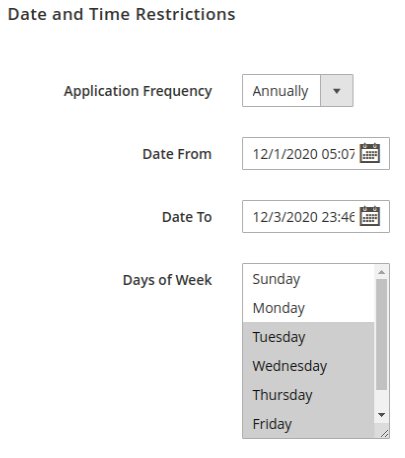
Datums- und Zeitbeschränkungen zeigen Versandmethoden nur an bestimmten Tagen oder in einem bestimmten Zeitraum. Wiederkehrende Termine werden unterstützt.
Application Frequency — Wie oft das Datum wiederkehrt, an dem die Versandmethode gezeigt wird.
Date From — Datum und Uhrzeit, ab wann die Versandmethode gezeigt wird.
Date To — Datum und Uhrzeit, bis wann die Versandmethode gezeigt wird.
Days of Week — Ist mindestens ein Eintrag gewählt, erscheint die Versandmethode nur an diesen Wochentagen.
Eine Preisregel anlegen
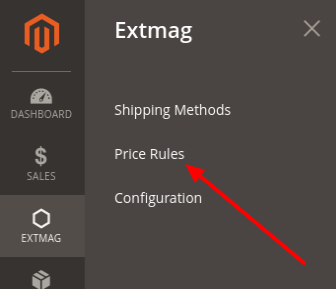
Zum Anlegen einer Preisregel gehen Sie zu Extmag -> Extended Shipping Rates -> Price Rules.
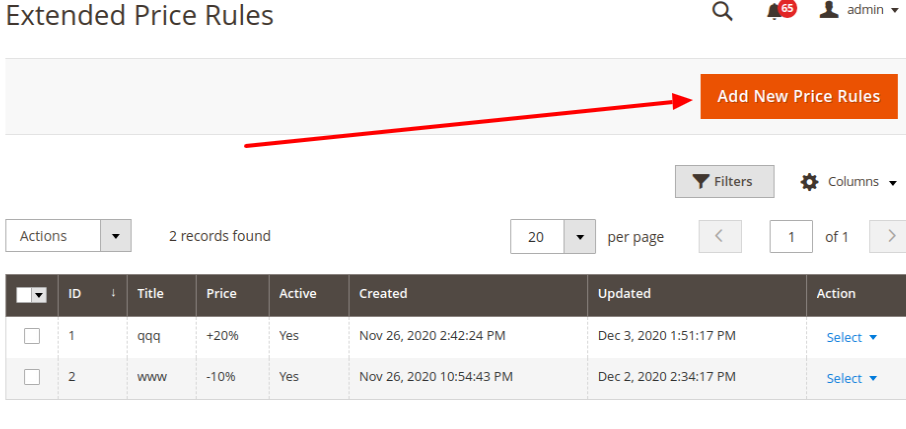
Klicken Sie auf die Schaltfläche „Add New Price Rules“.
Füllen Sie die Pflichtfelder aus und speichern Sie die Preisregel.
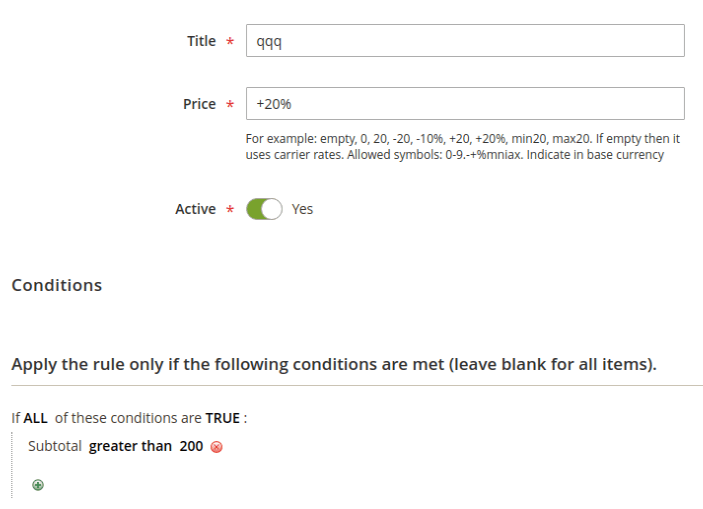
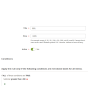
Title — Der Name der Preisregel.
Price — Eine Zahl oder ein Preismuster. Steht dort nur eine Zahl, ersetzt sie den Preis der Versandmethode. Steht dort ein Muster, wird es auf den Versandpreis angewendet.
Conditions — Die Bedingungen, unter denen diese Preisregel greift.
Preismuster
leer: leer lassen, wenn auf den Grundpreis kein weiterer Preis angewendet werden soll.
0: die Versandmethode wird kostenlos.
20: ein beliebiger Preis, der statt des Grundpreises gezeigt wird.
-20: eine Zahl mit Minus davor senkt den Grundpreis um diesen Betrag.
+20: eine Zahl mit Plus davor erhöht den Grundpreis um diesen Betrag.
-10%: Minus davor und Prozentzeichen dahinter senken den Grundpreis um diesen Prozentsatz.
+20%: Plus davor und Prozentzeichen dahinter erhöhen den Grundpreis um diesen Prozentsatz.
max20: mit dem Präfix „max“ wird der Endpreis höchstens so hoch.
min20: mit dem Präfix „min“ wird der Endpreis mindestens so hoch.
Die Zahlen 20 und 10 stehen nur als Beispiel; es kann jede Zahl sein.
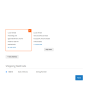
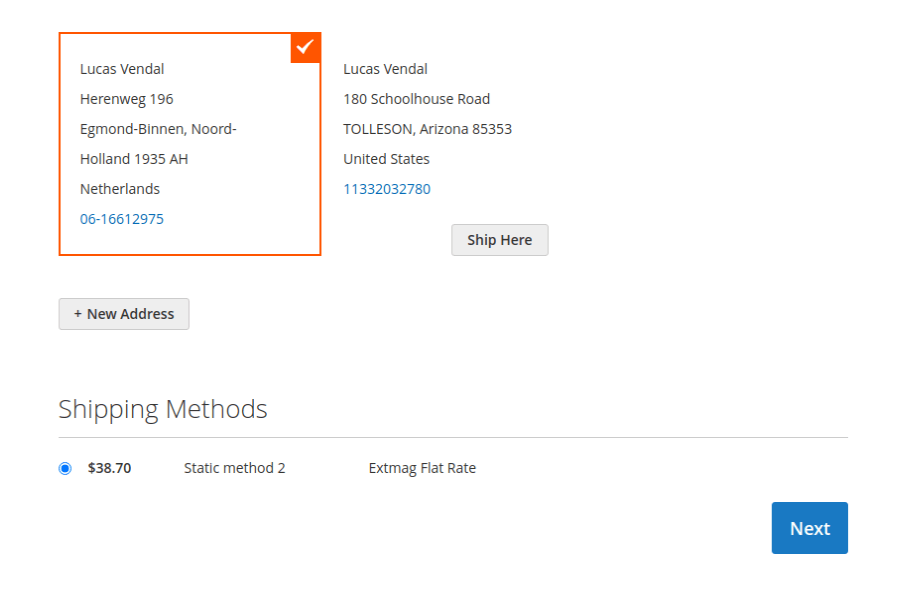
So erscheint die Versandmethode im Checkout:
1.6.1
Replaced the Alpine.js x-data disabled binding with a server-rendered disabled attribute.
1.6.0
Replaced the Alpine.js x-data disabled binding with a server-rendered disabled attribute.
1.5.9
Refactored Hyva checkout shipping method list to use SecureHtmlRenderer for CSP compliance.
1.5.8
Added support Magento 2.4.9 and Adobe Commerce 2.4.9
1.5.7
Added BlackoutRules feature with admin CRUD, repository, UI components, and migration patch.
1.5.6
Added support Magento 2.4.8-p4 and Adobe Commerce 2.4.8-p4
1.5.5
Refactored code.
1.5.4
Added support Magento 2.4.8-p3 and Adobe Commerce 2.4.8-p3
1.5.3
Added support Magento 2.4.8-p2 and Adobe Commerce 2.4.8-p2
1.5.2
Added support Magento 2.4.8-p1 and Adobe Commerce 2.4.8-p1
1.5.1
Added support Magento 2.4.8 and Adobe Commerce 2.4.8
1.5.0
Added support Magento 2.4.7-p5 and Adobe Commerce 2.4.7-p5
1.4.9
Added support Magento 2.4.7-p4 and Adobe Commerce 2.4.7-p4
1.4.8
Added support Magento 2.4.7-p3 and Adobe Commerce 2.4.7-p3
1.4.7
Fixed the z-index issue on the label details page.
Added support Magento 2.4.7-p2 and Adobe Commerce 2.4.7-p2
1.4.6
Added support Magento 2.4.7-p1 and Adobe Commerce 2.4.7-p1
1.4.5
Added support Magento 2.4.7 and Adobe Commerce 2.4.7
1.4.4
Integration with Hyva Theme and Hyva Checkout has been added
1.4.3
Added support Magento 2.4.6-p4 and Adobe Commerce 2.4.6-p4
1.4.2
Improve the speed of calculating rules
1.4.1
Fixed bug with conditions for Product Attributes Combinations
1.4.0
Added support Magento 2.4.6-p3 and Adobe Commerce 2.4.6-p3
1.3.9
Added support Magento 2.4.6-p2 and Adobe Commerce 2.4.6-p2
1.3.8
Added support Adobe Commerce 2.4.6-p1
1.3.7
Support Adobe Commerce (Magento) 2.4.6
Support PHP 8.1
1.3.6
Fixed some minor bugs
1.3.5
Fixed the PHP warnings
1.3.4
Support Adobe Commerce (Magento) 2.4.5-p1
1.3.3
Support Adobe Commerce (Magento) 2.4.5
1.3.2
Fixed etc/adminhtml/di.xml and etc/di.xml
1.3.1
Fixed bug with Magento 2.3 and dependency injection
1.3.0
Added shipping method logo.
Support PHP 8.1 and Magento 2.4.4
1.2.2
Fixed deprecated PHP function array_key_exists for objects
1.2.1
Added Date and Time
Restriction for Price Rule
Reformat code with the new style
1.2.0
A new parameter "Allowed areas" have been added that allows you to show the delivery method only in the admin panel
1.1.0
Added a link to the price rule edit page from the delivery method edit page
1.0.0
Module created

