
Prices Changer para Magento® 2.x

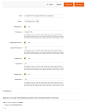
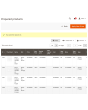
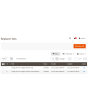
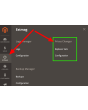
Com que frequência você precisa alterar o preço regular ou o preço especial de um grupo de produtos? Com o nosso módulo, você faz isso em poucos cliques. Você filtra produtos por quaisquer atributos para alterar seus preços. O módulo suporta diferentes fórmulas de alteração de preço.
Segurança
A segurança da alteração de preços é garantida de duas formas:
1. Todas as alterações de preço são feitas em uma única transação. Em caso de erro, o banco de dados reverte automaticamente as alterações.
2. Antes de cada alteração de preço, nosso módulo cria um backup dos preços anteriores. Em caso de erro, você pode reverter a qualquer momento.
Tipos de preço
O módulo suporta os seguintes tipos de preço:
- Price
- Special Price
- Cost
- Minimum Advertised Price (MSRP)
- Tier Price
- Customizable Options
- Atributos de produto do tipo "Price"
Fórmulas
Fórmulas para alteração flexível de preços:
- null: remove o preço do produto.
- 20: o número informado substitui o preço atual do produto.
- -20: o preço do produto é reduzido pelo número indicado.
- +20: o preço do produto é aumentado pelo valor indicado.
- -10%: o preço é reduzido pelo percentual indicado.
- +20%: o preço é aumentado pelo percentual indicado.
- max20: número com prefixo "max" — o preço final é menor ou igual a esse número.
- min20: número com prefixo "min" — o preço final é maior ou igual a esse número.
Os números 20 e 10 servem apenas como exemplo. No seu caso, podem ser quaisquer números.
Na fórmula também podem ser utilizados outros tipos de preço. Tipos de preço acessíveis: {{price}}, {{special_price}}, {{cost}}, {{msrp}}.
Em um conjunto podem ser usadas várias fórmulas.
Todos os preços devem ser informados na moeda base.
Demonstração
Você pode testar esta extensão por 30 dias. Solicite a demonstração nesta mesma página com Solicitar demonstração; como funciona está explicado em Teste uma extensão por 30 dias.
Exemplos
Alguns exemplos:
1
price: 80
cost: 50
formula: {{cost}} +150%
result: 125
2
price: 80
cost: 50
formula: {{cost}} +150% max110
result: 110
3
price: 80
formula: -15%
result: 65
| CMS | Magento 2 |
|---|---|
| Compatibilidade | 2.4, 2.3 |
| Recursos |
|
A extensão é instalada com o Composer. Qual repositório você adiciona depende de onde a comprou — a instalação em si é a mesma nos dois casos.
1. Conectar o repositório
Comprada na extmag.com. A página da sua conta mostra o endereço do repositório e suas credenciais pessoais, junto com os dois comandos composer config para colar. Execute-os uma vez por projeto; depois disso, toda extensão que você possui fica disponível no mesmo repositório.
Comprada no Adobe Commerce Marketplace. O pacote é servido de repo.magento.com, que a maioria das lojas já tem configurado. Se não for o caso, adicione as access keys da sua conta Adobe em My Profile -> Access Keys.
2. Instalar a extensão
Execute na raiz do projeto:
composer require extmag/pricer
php bin/magento setup:upgrade
php bin/magento cache:flush
O Composer resolve os pacotes Extmag compartilhados dos quais a extensão depende, então não há mais nada a exigir manualmente.
Saia do admin e entre novamente: a extensão está pronta.
Testar antes de comprar
Você pode pedir uma demonstração de 30 dias desta extensão e instalá-la exatamente como acima: mesmo pacote, mesmo repositório, mesmos comandos. Como funcionam as demonstrações.
Instalar sem o Composer
O arquivo pode ser descompactado em app/code/Extmag/, mas isso deixa a extensão fora do gerenciamento de dependências: os pacotes compartilhados precisam ser instalados à mão e as atualizações nunca chegam até ela. Use o Composer em qualquer loja que você opere, inclusive na demonstração.
Para qualquer dúvida sobre a instalação, fale com nosso suporte técnico.
-
User Guide User Guide.pdf · 3.0 MBDownload
-
Reference Manual Reference Manual.pdf · 425.3 KBDownload
-
Installation Guide Installation Guide.pdf · 224.6 KBDownload
O Prices Changer é operado pelo menu Extmag no admin do Adobe Commerce (Magento). Uma mudança de preços é descrita uma vez como Replacer Set — quais produtos ela atinge e quais são os novos preços — e depois é aplicada à mão ou entregue a um Schedule. Cada gravação fica registrada e todo set aplicado pode ser desfeito.
Replacer Sets
- Vá em Admin Main Menu -> Extmag -> Prices Changer -> Replacer Sets.
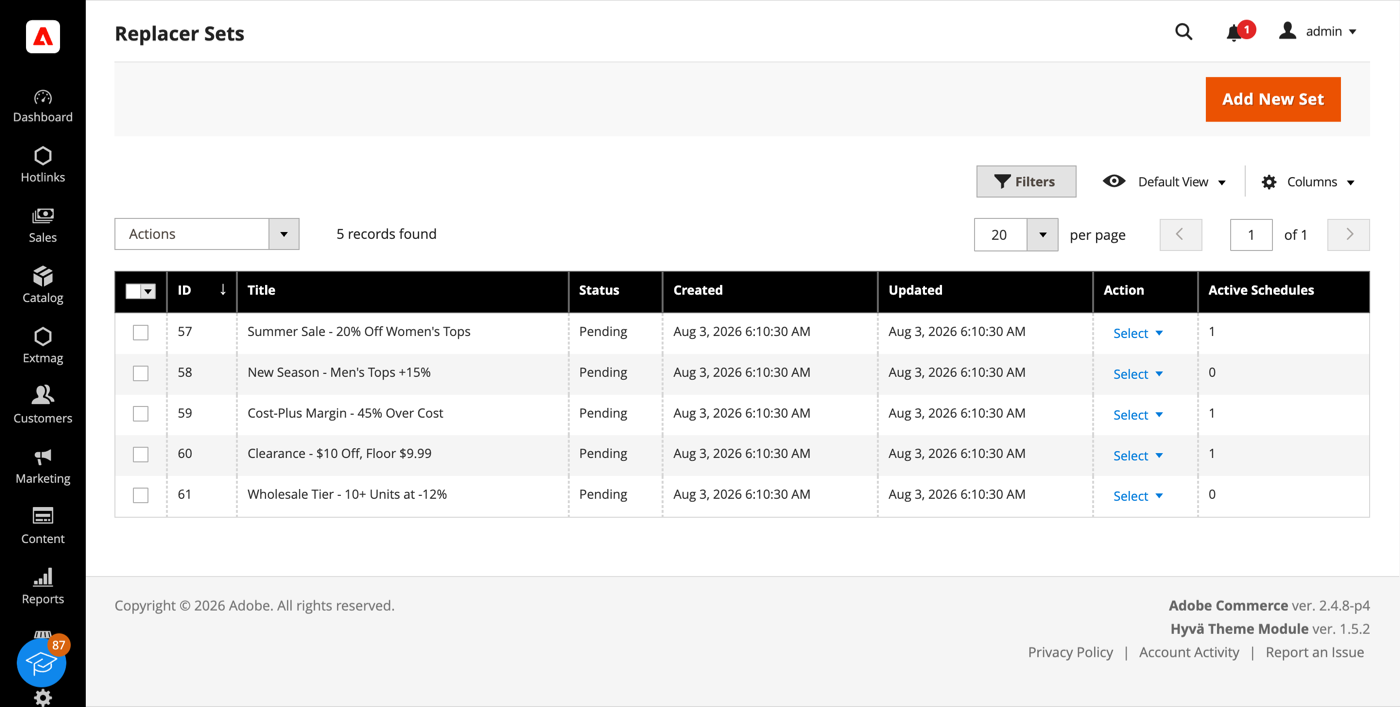
- Clique no botão «Add New Set».
- Dê um título ao set, ligue os tipos de preço que ele deve alterar e informe uma fórmula para cada um. Um tipo de preço desligado não é tocado.
- Em Conditions escolha a quais produtos o set se aplica: qualquer atributo de produto ou categoria, combinados com AND / OR. Uma árvore de condições vazia significa o catálogo inteiro.
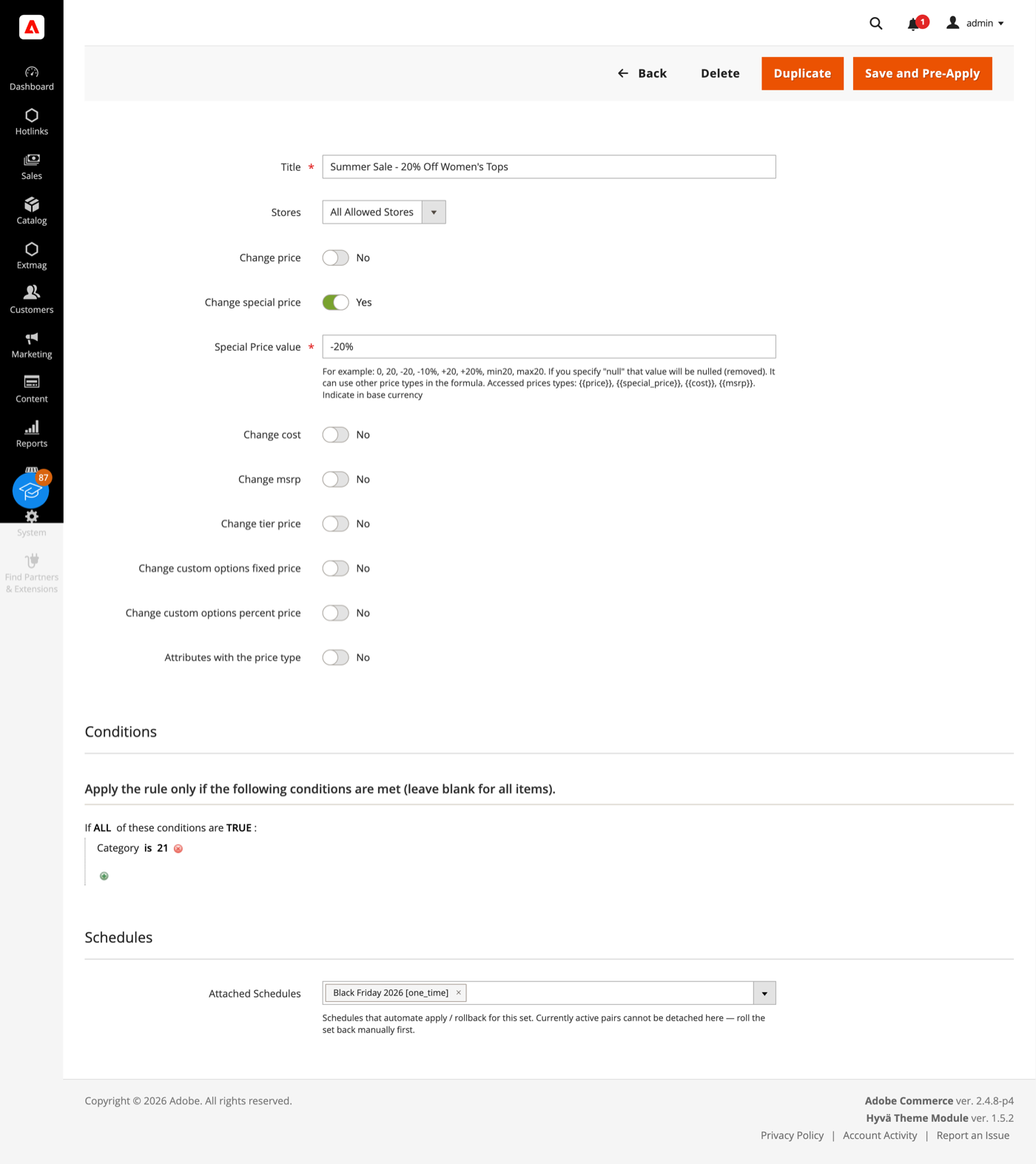
- Clique em «Save and Pre-Apply». O set é salvo com status Pending; nada é gravado no catálogo até você aplicá-lo ou um Schedule disparar.
Uma fórmula é escrita na moeda base e pode ser:
- 20 — substituir o preço por esse número.
- +20 / -20 — aumentar ou reduzir o preço em um valor fixo.
- +20% / -10% — aumentá-lo ou reduzi-lo em uma porcentagem.
- min20 / max20 — limitar o resultado por um piso ou um teto.
- null — remover o preço do produto.
- {{cost}} +45% min19.99 — construir um preço a partir de outro. Os tokens
{{price}},{{special_price}},{{cost}}e{{msrp}}podem ser todos usados e combinados.
O set cobre Price, Special price, Cost, MSRP, Tier prices, Customizable Options e qualquer atributo do tipo Price, cada um com sua própria fórmula.
Aplicar e desfazer
- Na grade de Replacer Sets, abra o menu Select da linha e escolha Apply.
- Antes de gravar qualquer coisa, o módulo salva os preços atuais dos produtos atingidos, para que a mudança possa ser desfeita depois. A aplicação em si roda dentro de uma única transação de banco: em caso de erro, o banco restaura o estado anterior sozinho.
- Para desfazer um set aplicado, escolha Rollback no mesmo menu. Os preços são restaurados a partir desse salvamento.
Um set com um Schedule anexado não pode ser aplicado nem desfeito à mão enquanto o Schedule estiver pending ou ativo: desanexe-o ou deixe terminar, para que um operador e o cron não gravem os mesmos preços ao mesmo tempo.
Schedules
- Vá em Admin Main Menu -> Extmag -> Prices Changer -> Schedules.
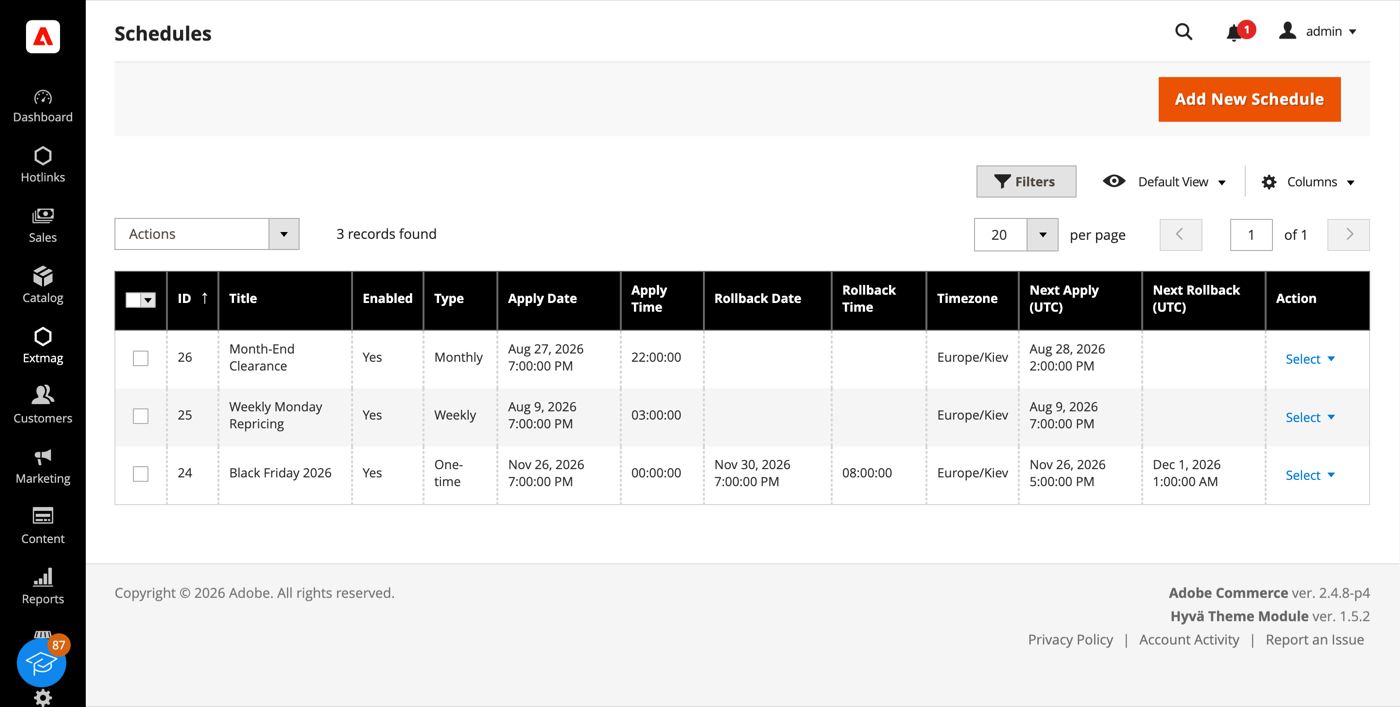
- Clique no botão «Add New Schedule».
- Escolha quando ele dispara — uma vez, anual, mensal, semanal ou uma expressão cron própria — e defina a data e a hora da aplicação. A data de reversão é opcional: preencha-a e os preços voltam sozinhos.
- Escolha o fuso horário em que os horários são lidos. Os disparos são guardados em UTC, então uma mudança de horário de verão não desloca uma promoção em uma hora.
- Anexe o Schedule a quantos sets precisar — pelo formulário do Schedule ou pelo campo Schedules do set. Um Schedule pode conduzir vários sets e um set pode ter vários Schedules.
Cada par de set e Schedule mantém o próprio estado e histórico de execução, então uma falha em um set não para os demais. Quando um disparo falha, o módulo pode avisar por e-mail uma lista de destinatários e deixar uma notificação na caixa do admin.
Price Change Log
- Vá em Admin Main Menu -> Extmag -> Prices Changer -> Price Change Log.
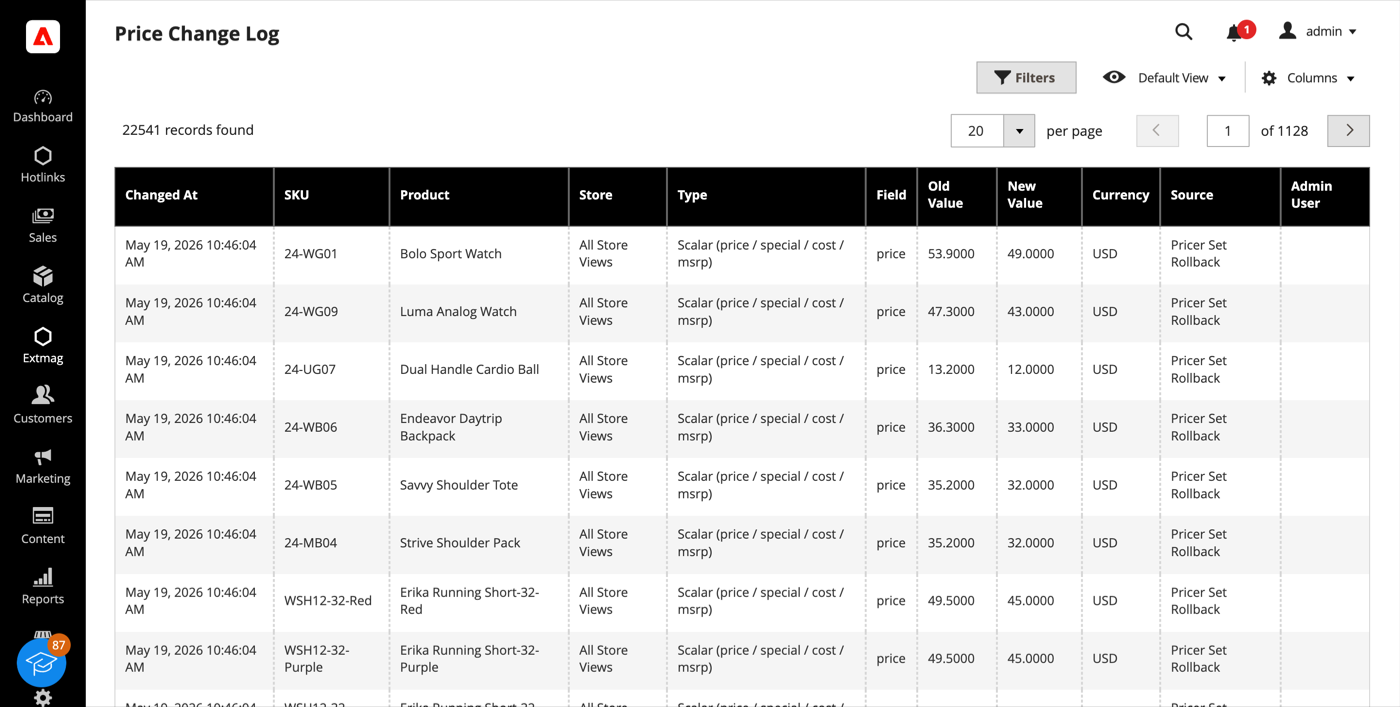
- Cada gravação de preço é uma linha: o produto, a store view, o tipo de preço e o campo, o valor antigo e o novo, a moeda, quem fez a mudança e por qual meio — edição no admin, importação, API REST, um Apply ou um Rollback do Pricer.
- O Price Log Statistics, no mesmo menu, totaliza o log por origem, por usuário admin e por SKU, e informa quanto espaço ele ocupa.
O log é apenas incremental e é gravado mesmo quando a mudança não veio deste módulo, de modo que responde a «quem baixou aquele preço e quando» para a loja inteira. Um cron diário remove as linhas mais antigas que o período de retenção escolhido.
Configuração
- Vá em Admin Main Menu -> Extmag -> Prices Changer -> Configuration.
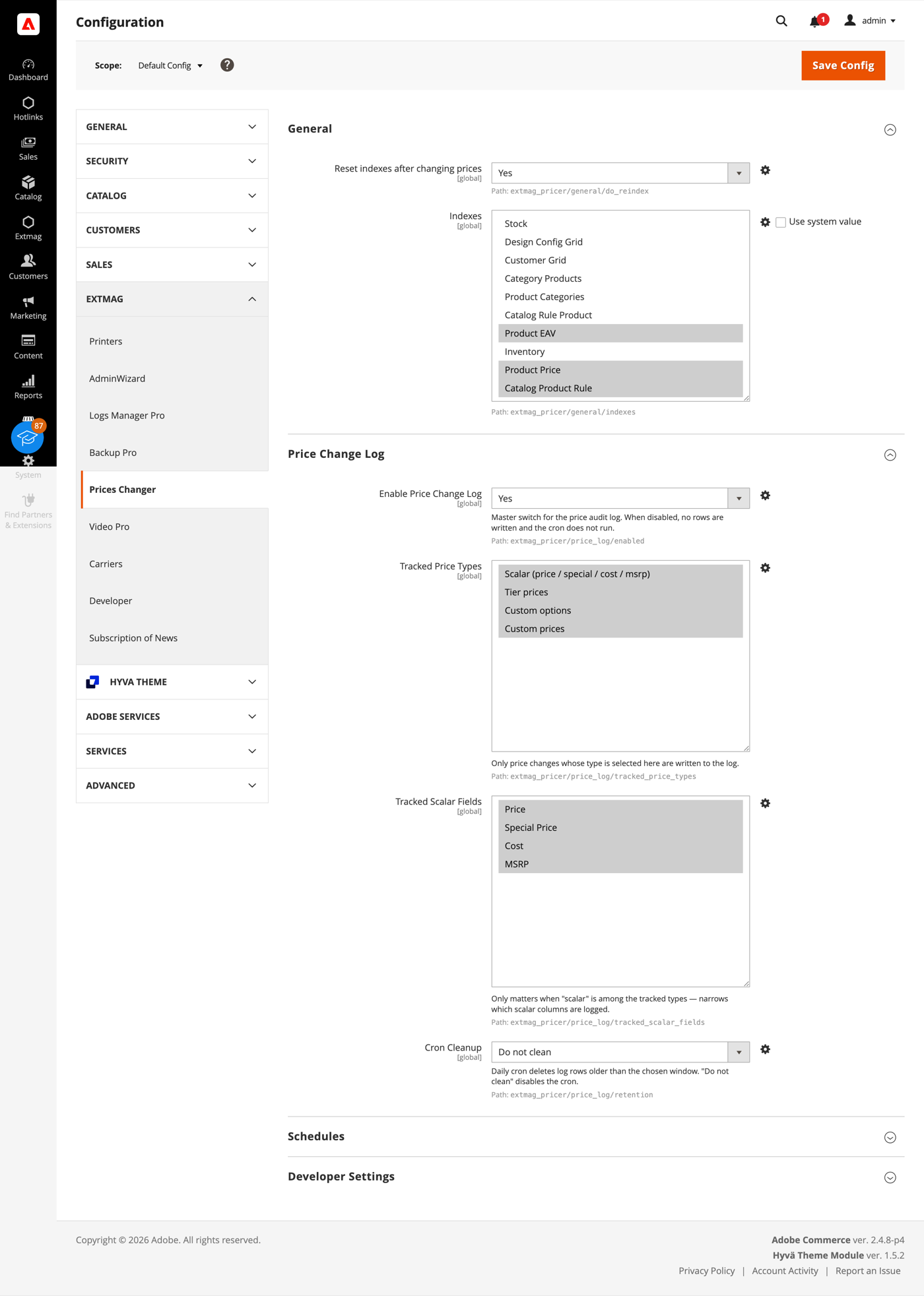
- Percorra os grupos preenchendo o que se aplica à sua loja.
Os grupos cobrem:
- General — se os índices são reiniciados após uma mudança de preços, e quais.
- Price Change Log — a chave principal, quais tipos de preço e campos escalares são registrados, e por quanto tempo as linhas ficam antes de o cron de limpeza removê-las.
- Schedules — a chave do cron dos Schedules, quantos são processados por rodada, o fuso horário padrão e os destinatários, o template e o remetente do aviso de falha.
- Developer Settings — como a etapa de aplicação conversa com o banco. Os padrões servem a uma loja em produção; o modo em blocos existe para catálogos acima de cem mil produtos, onde manter uma única transação aberta durante toda a execução não é prático.
Os sets levam em conta o Catalog Price Scope. Em escopo global os preços são gravados uma vez para todas as lojas; em escopo de site, um set lembra o escopo para o qual foi criado e se recusa a aplicar em outro, de modo que um preço destinado a um site nunca chega aos demais.
A referência completa campo a campo, com os caminhos exatos de configuração, está no Reference Manual que acompanha a extensão.
2.0.0
Switched server_time template to Escaper helper for output escaping. Reverted CSV import source wording in Price Change Log docs. Hardened inline script rendering via SecureHtmlRenderer in schedule server_time template. Corrected Price Change Log import source description.
1.6.9
Added support Magento 2.4.8-p4 and Adobe Commerce 2.4.8-p4
1.6.8
Refactored code.
1.6.7
Added support Magento 2.4.8-p3 and Adobe Commerce 2.4.8-p3
1.6.6
Added support Magento 2.4.8-p2 and Adobe Commerce 2.4.8-p2
1.6.5
Added support Magento 2.4.8-p1 and Adobe Commerce 2.4.8-p1
Fixed price template validation
1.6.4
Added support Magento 2.4.8 and Adobe Commerce 2.4.8
1.6.3
Fixed a bug with the product attribute with the website scope
1.6.2
Fixed a bug with the default store if prices are not set globally but per website.
1.6.1
Fixed bug with store scopes.
Added support Magento 2.4.7-p5 and Adobe Commerce 2.4.7-p5
1.6.0
Added support Magento 2.4.7-p4 and Adobe Commerce 2.4.7-p4
1.5.9
Added support Magento 2.4.7-p3 and Adobe Commerce 2.4.7-p3
1.5.8
Added support Magento 2.4.7-p2 and Adobe Commerce 2.4.7-p2
1.5.7-1.5.8
Added support Magento 2.4.7-p2 and Adobe Commerce 2.4.7-p2
Added support Magento 2.4.7-p1 and Adobe Commerce 2.4.7-p1
1.5.7
Added support Magento 2.4.7-p1 and Adobe Commerce 2.4.7-p1
1.5.6
Added support Magento 2.4.7 and Adobe Commerce 2.4.7
1.5.5
Added support Magento 2.4.6-p4 and Adobe Commerce 2.4.6-p4
1.5.4
Added support Magento 2.4.6-p3 and Adobe Commerce 2.4.6-p3
1.5.3
Added support Magento 2.4.6-p2 and Adobe Commerce 2.4.6-p2
1.5.2
Added support Adobe Commerce 2.4.6-p1
1.5.1
Support Adobe Commerce (Magento) 2.4.6
Support PHP 8.1
1.5.0
Improved filtering product collection and resetting product indexes.
1.4.4
Added availability to reset all indexes after changing prices.
1.4.3
Fixed the problem with tier prices and option All Websites
1.4.2
Fixed some bugs with XML layout and PHP conditions.
1.4.1
Fixed some minor bugs with Conditions in Price Sets.
1.4.0
Added the ability to change the prices of product attributes with the type "Price"
1.3.0
Fixed some minor bugs.
Changed behavior for Website Prices and Global Prices.
1.2.0
Added the ability to change the prices of custom options
1.1.2
Fixed the PHP warnings
1.1.1
Support Adobe Commerce (Magento) 2.4.5-p1
1.1.0
Added opportunity for bulk changing Tier prices of products
1.0.0
Support PHP 8.1 and Adobe Commerce 2.4.4